Firefox 從版本3開始,使用新的文件格式來儲存瀏覽的歷史紀錄,而不是把這些紀錄存於mork文件格式,紀錄改為保存在一個SQLite資料庫
文件位置(File Locations) Windows XP中 C:\Documents and Settings\<username>\Application Data\Mozilla\Firefox\Profiles\<profile folder>\places.sqlite Windows Vista C:\Users\<user>\AppData\Roaming\Mozilla\Firefox\Profiles\<profile folder>\places.sqlite GNU/Linux /home/<user>/.mozilla/firefox/<profile folder>/places.sqlite Mac OS X /Users/<user>/Library/Application Support/Firefox/Profiles/default.lov/places.sqlite
文件標頭(File Header) Firefox 3 history files start with 53 51 4C 69 74 65 20 66 6F 72 6D 61 74 20 33 which represents the ascii string SQLite format 3. This is normal for any Sqlite database file, so it may be more appropriate to verify that the file is a Firefox 3 history file by looking for the database tables within the file. For example, at offset 120701 (0x1D77D) the hex value 43 52 45 41 54 45 20 54 41 42 4C 45 20 6D 6F 7A 5F 62 6F 6F 6B 6D 61 72 6B 73 can be found. This represents the ascii string CREATE TABLE moz_bookmarks. At offset 120973 (0x1D88D) the hex value 43 52 45 41 54 45 20 49 4E 44 45 58 20 6D 6F 7A 5F 62 6F 6F 6B 6D 61 72 6B 73 5F 69 74 65 6D 69 6E 64 65 78 can be found. This represents the ascii string CREATE TABLE moz_bookmarks_itemindex.
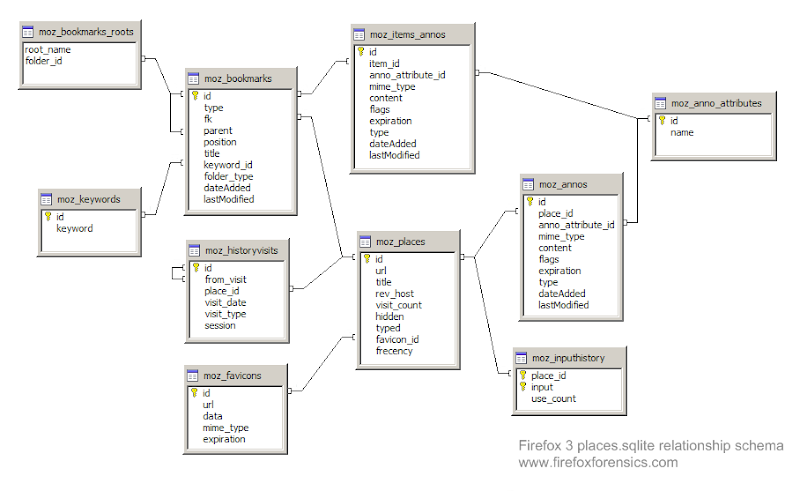
資料庫表(Database Tables) The places.sqlite file is essentially a database with multiple tables: moz_anno_attributes moz_annos moz_bookmarks moz_bookmarks_roots moz_favicons moz_historyvisits moz_inputhistory moz_items_annos moz_keywords moz_places
參考來源:wiki