PIXNET Logo登入

Invisible Man

跳到主文

電腦鑑識、資料救援、資料還原、惡意程式

部落格全站分類:數位生活

  • 相簿
  • 部落格
  • 留言
  • 名片
  • 2月 06 週六 201019:37
  • 搬家啦~

請連 http://jay-fva.blogspot.com/
這邊暫時不更新嚕~ ^^
(繼續閱讀...)
文章標籤

Recover 發表在 痞客邦 留言(1) 人氣(357)

  • 個人分類:
▲top
  • 2月 06 週六 201019:12
  • 資料完全銷毀手冊(中)

56148_3_1_l.jpg 硬碟篇─徹底銷毀硬碟資料的7大方法 接下來我們將要介紹7種不同銷毀硬碟的方法,這些方法分別是格式化、滴鹽酸、火燒、鐵鎚敲、泡水、消磁與刀割碟片。每一種方法都會以破壞度這個指標,區分為高、中、低3個等級來評量。並且透過專家提出的意見,探討每一種方法摧毀硬碟的程度。
雖然硬碟的磁頭讀取資料時,與硬碟碟片間的距離,只有10奈米左右(比一根頭髮還細),硬碟的外殼如果被打開,灰塵進入碟片內部後,就很有可能會對硬碟造成一定程度的傷害,灰塵也可能讓磁頭在讀取的過程中刮傷碟片,導致硬碟損壞。不過若是要談到徹底銷毀資料,光是打開硬碟上蓋,可能還是遠遠不夠,因為還是存在著硬碟資料被讀取出來的可能性。而我們列出的這7種方法,是以有心想要竊取資料的其他人,有能力取得專業的設備為前提之下,硬碟的使用者到底該怎麼徹底的將硬碟以各種手段破壞。 硬碟碟片的材質為鋁鎂合金或玻璃,再鍍上磁性金屬膜。所以碟片本身雖然輕,但也有一定的堅固程度。 硬碟外殼只要打開,碟片沾上了灰塵,就有可能會讓磁頭在運作時刮傷碟片,導致硬碟損壞。 方法1 低階格式化
格式化是最普遍的做法,不過要注意的是,必須使用將硬碟每個磁區都以資料重新覆寫的低階格式化,才能真正發揮效果。一般透過作業系統進行的高階格式化,資料仍可救回。不過低階格式化耗時良久,所以其他物理破壞的方法也有使用的必要性。 方法2 泡水法
硬碟碟片直接丟到水裡,由於水會破壞碟片上紀錄資料的磁粉,所以當水透過硬碟外殼平衡氣壓的小孔,浸泡到內部碟片,就會將資料完全銷毀。但若只是乾淨的水,資料回復廠商認為,還是有可能救回部分資料,但仍需視進水狀況。 方法3 焚毀法
如果直接把硬碟碟片拆下來,對著每一片碟片的表面用火燒,磁粉會被破壞,那當然是無法救回資料了,但是也必須確保每一塊碟片表面都燒的均勻。但若是把整臺硬碟丟到大火裡,其實要完全銷毀資料不是那麼容易。一般硬碟可容忍的溫度是在攝氏80~90度,且硬碟除了電路板之外,其他關鍵部分(如馬達、磁頭、碟片等)多數都是金屬,並不易燃,所以將整臺硬碟直接丟到火裡燒毀的方式,其實很難完全確保每個碟片都被燒毀。當然,如果以超高溫燒到碟片都變形,那麼也是可以完成資料銷毀的工作。不過焚毀法有一定的危險性,真的要使用請注意場地的選擇。 方法4 刀割碟片法
直接把硬碟的外殼打開,用刀片割碟片,割出一條半徑,也能達到銷毀硬碟的效果。由於硬碟是以碟片高速旋轉的方式紀錄資料,從圓心割一條半徑到圓周,幾乎就摧毀了整片碟片上的磁軌,大概就只剩下小檔案還有機會被讀出來。 方法5 滴鹽酸法
不只是鹽酸,事實上腐蝕性的液體對於摧毀碟盤上的磁粉,有很顯著的效果。不過使用鹽酸和泡水法的問題很像,要徹底銷毀資料的話,還是需要確保每一片碟片都受到腐蝕液體的浸泡,如果沒有做到徹底,還是有微小的機會被救回資料。 方法6 消磁法
無論是用強力磁鐵直接對著碟片消磁,還是使用消磁機,消磁都是一個銷毀硬碟資料的簡便方法。不過到底能不能夠做到完全消磁,對於很多人來說都還存在著疑慮。由於現在硬碟的設計,外層的金屬和上蓋,都有針對磁力影響做出保護,加上多片碟片的設計,消磁機在資料徹底銷毀的角度來看,還是存在著幾分不確定性。而直接使用磁鐵去替硬碟的碟片消磁,更必須確保每一塊碟片的每一個角度都必須以強力磁鐵吸過,否則不可能做到消磁。不過2.5吋硬碟由於相對於3.5吋硬碟來說,較為輕薄,消磁的難度比較低。 方法7 鐵鎚敲擊法
鐵鎚是很多IT人員用來摧毀報廢硬碟的工具,事實上這也是個好工具。只要把硬碟的外殼打開,用鐵鎚稍微敲幾下碟片,磁頭和碟片的定位往往就會歪掉,其他人要重新找回定位點,進而讀取資料就十分困難了。
如果把碟片拿下來,用鐵槌敲到變形,更是不可能救回資料,碟片將完全無法透過任何磁頭讀取。即便沒有打開外殼,透過鐵鎚用力敲擊硬碟,往往也會損害到磁頭,並且會造成碟片被刮傷。當然,最好的方法還是用力把碟片敲到變形,如此就能確保資料絕對讀不出來。
不過,必須注意的是,如果只是隔著外殼重敲幾次,由於可能僅是造成碟片被磁頭刮傷,碟片上的資料還是有可能透過專業的資料復原廠商救回。如果考量到一定要徹底的銷毀,最好還是打開硬碟的上蓋,對著碟片重敲,如果能夠敲到碟片變形,當然就更安全了。
(繼續閱讀...)
文章標籤

Recover 發表在 痞客邦 留言(0) 人氣(1,243)

  • 個人分類:資料還原
▲top
  • 2月 05 週五 201021:17
  • 資料完全銷毀手冊(上)

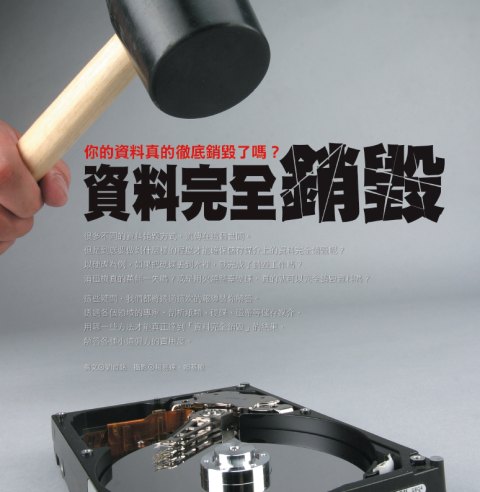
56148_1_1_l.jpg 很多不同的資料銷毀方式,流傳在這個世間。但是到底要做到什麼樣的程度才能確保儲存媒介上的資料完全銷毀呢?以硬碟為例,如果把硬碟丟到水裡,就完成了銷毀工作嗎? 很多不同的資料銷毀方式,流傳在這個世間。
但是到底要做到什麼樣的程度才能確保儲存媒介上的資料完全銷毀呢?以硬碟為例,如果把硬碟丟到水裡,就完成了銷毀工作嗎?消磁機真的萬無一失嗎?或是用火燒整臺硬碟,真的就可以完全銷毀資料嗎?
這些疑問,我們都將透過這次的報導替你解答。透過各個領域的專家,剖析紙類、硬碟、磁帶等儲存媒介,用哪一些方法才能真正達到「資料完全銷毀」的結果,解答各種小道偏方的實用度。
資料真的徹底銷毀了嗎?
網路上常會看到一種摧毀硬碟的方法,那就是把硬碟丟到水裡泡水,但是這樣真的就完全不可能救回資料嗎?這可能不一定。
硬碟篇─徹底銷毀硬碟資料的7大方法
我們將要介紹7種不同銷毀硬碟的方法,這些方法分別是格式化、滴鹽酸、火燒、鐵鎚敲、泡水、消磁與刀割碟片。
紙類篇─碎斷式碎紙機才能夠完全銷毀紙張
如果碎紙時,依照文字排列的方向放入長條式碎紙機,結果就很有可能會是整行的字依然清晰可見,無法達成資料銷毀的效果。
磁帶篇─縱面剪斷才能確保磁帶銷毀
之所以要用縱面剪斷的方式,是因為如果採用橫面剪斷的方式,還是有可能讓有心人士從片段的磁帶取得資訊。 資料真的徹底銷毀了嗎? 英國電信(British Telecom,BT)曾經在2年前做過一個研究,他們和英、美多所大學合作,從不同的管道蒐集350顆被丟棄或是流通到二手市場的硬碟,然後研究是否能夠還原這些硬碟的原有的資料。研究的結果頗令人乍舌,他們發現,37%的硬碟(也就是約130顆硬碟)都能夠透過簡單的資料復原軟體,找回敏感的個人或企業資料。這些資料包括個人薪資、特定企業財務資料、信用卡號、醫療資料、信用卡申請資料、網路購物資料等。 根據調查機構Dataquest所做的統計,每一年全世界大概有1億5千萬顆硬碟被丟棄或汰換,如果和上一個研究的數字一起推算,儲存在這些硬碟裡的資料,若有37%沒有做好資料銷毀的處理,試想將有多少敏感資料有可能因此而外洩。其實資料沒有被完全銷毀的狀況非常普遍,幾年前,IEEE的安全與隱私期刊,刊登了2位麻省理工學院學生的一個小實驗。他們從二手市場購買了158臺硬碟,最後發現,只有12臺硬碟的前任使用者,有做到資料完全銷毀的工作,其他的硬碟透過資料復原軟體都能還原部分或全部的資料,甚至還有一顆硬碟內有5,000筆信用卡號。 你所知的資料銷毀方式,真的有辦法徹底銷毀嗎?
那麼,我們不禁要問,到底該怎麼做才算是完全把資料銷毀呢?這次的封面故事,就將以這個疑問為出發點,實驗各種不同常見儲存媒體的破壞方式,以各種狀況來考驗資料完全銷毀這件事情。並且會透過硬碟製造商、儲存系統整合廠商、資料復原專家,來探討每一種方式處理後,資料被救回的可能性。 之所以要這麼做,是因為很多我們以為可以徹底摧毀儲存媒介的破壞方式,往往並不是那麼正確與徹底。舉例來說,在網路上常會看到一種摧毀硬碟的方法,那就是把硬碟丟到水裡泡水,但是這樣真的就完全不可能救回資料嗎?這可能不一定。專門從事資料救援的凌威科技總經理江智雄就表示,如果用清水去泡,不見得能夠完全防止資料被復原,雖然有一定難度,但還是有可能透過像他們這樣的廠商,救回部分的資料。「真的要泡水的話,我會建議泡在泥水裡,這樣復原難度就更高了。」江智雄說。不過,事實上在2004年,日本富士通(Fujitsu)的子公司山形富士通,就曾經協助企業救回被泥水泡過的硬碟資料,雖然只是部分,但也證明了水攻的方式,可能不如我們想像中那麼徹底。除了這個例子之外,在山形富士通的案例中,還曾救回過碟片已經被鑽孔的硬碟內部分資料,這些事例都顯示出一個事實,如果連這樣的破壞方式,專業人士都還有可能救回部分資料,那麼到底平時我們認為可以銷毀儲存媒介的各種方法,是否真的那麼管用?
日本的山形富士通公司,曾救回已經被泥水嚴重損害(如圖)的硬碟,成功還原部分資料。 除了曾經救回被泥水浸泡過的硬碟外,山形富士通的案例中,也曾救回碟片已經被穿孔的硬碟內部分資料。 繼續以硬碟為例子,硬碟運作最重要的3大元件是碟片、馬達與磁頭,因此在考慮徹底銷毀硬碟上儲存的資料時,其實很重要的關鍵是對於碟片的損害程度,理論上,只要碟片上的磁粉受到損害,或是碟片因為外力而變形,儲存在上面的資料就難以回復了。所以在考慮用哪些方法才可以達到硬碟內資料的徹底銷毀時,就必須從這樣的角度來思考,讓一丁點資料回復的可能性都被屏除。
那如果用火呢?自三國時代以來,中國的軍師總是特別愛用火計,比如說陸遜曾經火燒蜀營300里;孔明也有過以火大破藤甲兵……,雖然紙類和磁帶用火來銷毀十分有效,但硬碟可能就不完全是這麼一回事了。硬碟製造商日立環球儲存科技(Hitachi GST)技術支援協理蔡正平表示,一般來說硬碟的日常存放耐熱溫度為攝氏80~90度,所以直接用一般的點火方式來烤硬碟,不見得能夠摧毀硬碟內的資料。直接用高溫的噴槍對著硬碟內部的碟盤表面燒,或是以超高的溫度燒到整個硬碟變形,可能才能達到完全摧毀硬碟的效果。另一家硬碟製造商希捷(Seagate)也有類似看法,他們透過書面回覆指出,用一般的火燒方式來焚燒硬碟,不見得能夠完全摧毀硬碟的資料,如果沒有燃燒完全,還是有極小的可能被有心人士取得沒有受損的碟片,進而取得硬碟內存的資料。
日立環球儲存科技技術支援協理蔡正平說:「硬碟的存放耐熱溫度為攝氏80~90度,所以火燒硬碟,不見得能摧毀硬碟內的資料。」 將磁區全部覆蓋的低階格式化才能真正銷毀資料
而在硬碟還能正常運作的狀況下,格式化是否能夠確保資料完全銷毀呢?事實上格式化分為兩種,一般透過作業系統指定硬碟磁區為可寫入狀態的格式化,被稱為高階格式化,在這樣的狀況下,其實舊有資料並沒有真正被刪除,只是被指定為「可寫入」的區域,所以透過類似FinalData等軟體,還是可以找到硬碟的目錄檔,進而復原資料。儲存系統整合廠商臺灣IBM資深資訊工程師林利民表示,真正的格式化,必須要使用俗稱低階格式化的方式,也就是將磁區全部用其他的資料寫入覆蓋,如此才能達到資料完全被刪除的效果。林利民說:「如果我只能選擇一種硬碟的破壞方式,我會選擇使用低階格式化,全部覆寫之後,資料要救回來就非常困難了。」

臺灣IBM資深資訊工程師林利民說:「必須要使用低階格式化的方式,將磁區全部用其他的資料寫入覆蓋才能徹底銷毀資料。」 事實上,林利民的此一看法也被硬碟製造商所證實,蔡正平指出,如果硬碟還可以運作,在現在硬碟容量越來越大,磁軌密度越來越高的狀況下,低階格式化將所有檔案覆寫的方式,只要一次,資料幾乎就不可能被救回。過去的硬碟由於磁軌間的間隔較大,也沒有專門進行低階格式化的軟體,所以自行以資料覆蓋的方式,還是有可能會有少數磁軌的資料沒有被覆蓋,讓這些資料有機會被救回。但是在現在的硬碟上,這些都已經不是問題,低階格式化幾乎是確保資料不外洩的最好方法。不過低階格式化也有其缺點,因為必須將所有的磁區都寫入資料覆蓋一次,所以低階格式化需要花費的時間也比較久,往往都需要數小時才能完成。
而除了硬碟之外,許多其他常用的資料儲存媒介,其實在銷毀上也有很多必須注意的事情。舉例來說,紙類資料如果順著行文方向放入長條式的碎紙機,那麼很有可能碎出來的字還清晰可見,甚至整行字都可閱讀,如此一來,就失去了原本銷毀資料的意義。
無論如何,硬碟很明顯的是目前最難銷毀的儲存媒介,為了真正去驗證每一種硬碟銷毀方法,我們將會在接下來的篇幅介紹7種不同破壞硬碟的方式,包括用鐵鎚、鹽酸、消磁、刀割等,並且提供專家對每一種方法的評論,供大家參考。此外,也將針對碎紙機器的差異,以及相對較易銷毀的磁帶,做一些銷毀手法的介紹。

透過一些簡單的工具,其實就能夠達到銷毀各種不同儲存媒介的目的。較為脆弱的紙類和磁帶,尤其容易以消磁、刀刃或火燒的方式處理。至於硬碟則較為困難,必須考量到摧毀碟片的程度,才能不留下任何讓別人取回資料的機會。
(繼續閱讀...)
文章標籤

Recover 發表在 痞客邦 留言(0) 人氣(3,672)

  • 個人分類:資料還原
▲top
  • 2月 04 週四 201018:53
  • CDRoller 8.70.80 光碟救援軟體

jb0ocz.jpg
jb0ocz.jpg CDRoller是一款功能強大、簡單易用且低花費的CD/DVD/BD資料救援軟體。提供了極強的光碟讀取和糾錯能力,可以用來恢復使用"拖放"方式刻錄的 CD/DVD/BD (如Roxio (Adaptec) DirectCD 和 Ahead Nero software)中的資料;方便的抓音軌轉換編碼功能;光碟分析和讀寫等檢測工具;快速方便的建立CD分類庫和搜索功能;從劃傷、損壞或失效的光碟中恢復資料;具有與Windows資源管理器類似的用戶操作界面等特性。 CDRoller 是多功能的光碟工具,主要功能有可複寫式光碟 UDF 資料檔讀取、光碟音樂音軌抓取、光碟多媒體分析/測試工具、光碟資料救回、光碟映像檔製作..等等,支援的 CD 及 CD-R 格式:CD-DA、CD-ROM、CD-WO、CD-RW、CD-ROM XA、混合模式光碟、多重區段壓片光碟。 - Fault-tolerant 資料光碟瀏覽及內建遺失資料音軌搜尋功能的內容讀取工具;
- 區段(Session)選擇工具,取回多重區段壓片光碟的所有區段;
- UDF 讀取工具具有額外的移失資料救回及搜尋能力;
- CD Data Rescue 的資料救援功能,可以將無法讀取的光碟檔案、資料夾救回;
- 抓取數位音樂光碟音軌(將音樂光碟轉成 WAV 檔);
- 光碟多媒體檔案測試及分析;
- 具有強大搜尋選項的快速、簡易使用的光碟多媒體分類功能;
CDRoller is a powerful, easy-to-use and low-cost toolset for CD/DVD data recovery. CDRoller supports industry-standard ISO 9660 file system, including Microsoft's extensions for long file names support, so-called Joliet extensions. CDRoller also supports the discs formatted in UDF file system, including versions 1.02, 1.50, 2.0, 2.01 and also so-called UDF Bridge format. Support of wide set of CD, CD-R, CD-RW and DVD formats such as: CD-DA, CD-ROM, CD-WO, CD-ROM XA and Mixed-Mode CD, Stamped multisession CD, CD-MRW ("Mt. Rainier" CD-RW), DVD-ROM, DVD-R, DVD-RW, DVD+R, DVD+RW, DVD-RAM.
Key Features:
Effectively retrieves the lost data from the discs created by "drag and drop" CD/DVD/BD writing software, such as well-known Sonic (Roxio, Adaptec) and Ahead Nero software packages, CeQuadrat's PacketCD, DLA, B's CLiP and others.
Reads unfinalized ("open", "left as-is") CDs and DVDs, including the discs with Microsoft's Live File system.
Recovers DVD movies and photos, created by a wide set of standalone devices that record directly onto disks: Hitachi, Canon, Panasonic, Samsung and Sony DVD camcorders as well as standalone video recorders.
Splits the recovered VOB or VRO video files into a several clips (scenes), automatically converting a "raw" DVD-video into generic MPEG files without loss of quality. Specially tested on the discs, recorded by Hitachi DVD camcorders.
Burns a new DVD with recovered video that can be played back in the most DVD players.
Recovers CD data written by Sony Mavica CD digital cameras.
Includes a fault-tolerant UDF Reader. Provides direct access to UDF discs, including CDs and DVDs written by old versions of Roxio (Adaptec) DirectCD and Drag-To-Disk. Finds and retrieves accidently deleted files, files located in the corrupted folders, files on incorrectly closed disks, etc.
"On-the-fly" unpacks the files initially compressed by Roxio (Adaptec) DirectCD.
Retrieves back up files from the discs recorded in several stages (multisession discs).
Includes a built-in CD/DVD/BD data burner. There is no need to run third-party CD/DVD/BD mastering software if you wish to burn a new DVD-video disc or backup your files and folders immediately after recovery. The "Burn" option is integrated into a common shell. Just write a new disc with recovered data shortly, without leaving CDRoller!
Erases CD, DVD and BD re-writable media. Supports quick and full erase methods.
Examines disc sectors at low level. Displays the sector content in text, binary, hexadecimal or unicode mode. It also scans all sectors of a disc (selected track or file) for particular data. Recommended for engineering purposes and also for law enforcement and forensic investigators.
Identifies the lost files on ISO/Joliet discs with the damaged file system (volume descriptors, path tables and directories), using the raw data only.
Rescues the data from scratched, damaged or defective discs.
Provides direct access to hardware, bypassing the Windows File System. Looks for the lost tracks (sessions) every time when you insert a new disc into the drive. Supports SCSI Pass Through Direct (SPTD) layer as alternative method under Windows 2000/XP/2003/Vista.
Digitally extracts audio tracks into a wide set of wave formats.
Tests disc readability.
Extracts ISO Image file. Burns ISO Image file to a new disc.
Catalogs files and folders into CD/DVD library.
All features are integrated into a common and easy-to-use intuitive shell.
下載
(繼續閱讀...)
文章標籤

Recover 發表在 痞客邦 留言(0) 人氣(6,064)

  • 個人分類:鑑識工具
▲top
  • 2月 03 週三 201016:50
  • 國家級標準銷毀儲存媒體資料

坊間充斥著各式各樣關於銷毀儲存資料的方法,如果擔心這些土法煉鋼的偏方不合實際需要,可參照美國國防部認可的標準,實現更徹底、安全的資料銷毀作業


低階格式化、泡水、焚燒、消磁、敲擊使碟片變形等等,是坊間流傳的種種如何徹底銷毀儲存媒體資料的方法,但對企業來說,這些方法的適用性可能大有問題。
一來許多方法的有效性並無法得到確認,而且缺乏明確的操作標準來指引使用者,如依據怎樣的程序執行、執行到怎樣的程度,才能達到銷毀資料的效果;二來大多數儲存媒體(特別是硬碟)在設計上都已考慮防護撞擊、變形與屏蔽外部磁力影響的問題,要透過物理破壞來銷毀資料,實際執行也不容易。
為了實現更有效、執行上也更明確可行的資料銷毀工作,參考各國官方認可的資料銷毀程序與規範,並導入遵循規範的產品,將是更適合企業環境的作法。
在資料銷毀這個領域,美國國防部的DOD 5220.22-M標準或許是最廣為人知,也是應用最廣的一套規範。
認識美國國防部DOD 5220.22-M標準
許多人都把DOD 5220.22-M直接當作資料清除與銷毀的標準,事實上這種看法有所誤解。DOD 5220.22-M是美國國防部在「國家工業安全計畫(National Industrial Security Program)」下,所制定的「國家工業安全計畫操作手冊(National Industrial Security Program Operating Manual,NISPOM)」。
NISPOM這份手冊涵蓋的範圍很廣,資料清除與銷毀只占舊版手冊(95年1月發布,97年7月修正)第8章第3節的一部分,其中提供了一個清除與銷毀資料方法的參考矩陣表。而最新版(2006年2月發布)NISPOM中,資料清除與銷毀更只剩兩小段,清除與銷毀資料的方法矩陣表也被刪除,改由國防部所屬國防保安處(Defense Security Service,DSS)提供資料清除與銷毀方法參考矩陣表(Clearing and Sanitization Matrix,C&SM)。
儘管現在的新版DOD 5220.22-M已不再提供任何具體的資料清除與銷毀方法,但舊版手冊的方法仍有參考價值。其中定義了兩種清除資料需求:
● 清除(Clearing):在重新使用媒體之前,徹底刪除媒體中資料的程序,且在清除媒體中資料之前,作業環境可提供可接受的保護等級。舉例來說,所有內部記憶體、緩衝區或其他可重複使用的記憶體,都必須執行清除,以有效杜絕讀取先前儲存的資料。
● 銷毀(Sanitization):在重新使用媒體之前,徹底刪除媒體中資料的程序,且在銷毀媒體中資料之前,作業環境無法提供可接受的保護等級。例如,當資訊系統資源從保密資訊管制下釋出、或釋出到較低的保密層級使用前,都必須執行資料銷毀。
執行資料清除或銷毀的方法
無論舊版DOD 5220.22-M或後來的DSS C&SM,均分別針對磁帶、磁碟、光碟、記憶體等四種類型的儲存媒體,以及同樣會暫存資料的印表機,提出了17種刪除資料的方式。而這些方式中,有15種適用於儲存媒體,又可分為消磁、覆寫、紫外線刪除與物理摧毀等基本方式。
適用的儲存媒體類型
四種儲存媒體包括:
● 磁帶:分為Type I、II、III等3類,Type I指磁化記錄時的磁場強度為350厄斯特(oersted,磁場強度單位,縮寫為Oe)以下,Type II介於351與750Oe之間,Type III則大於750Oe。
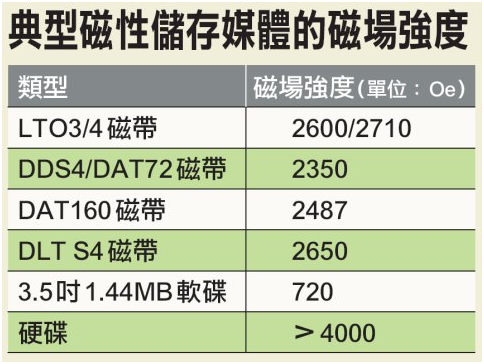
由於DOD 5220.22-M這張參考表制定的時間相當早(距今已超過10年),因此前述磁帶磁化磁場強度標準已與當前的產品有相當落差,如目前最普遍使用的LTO-3、4磁帶,磁場強度便分別高達2600與2710Oe。
● 磁碟:包括Bernoulli式磁碟、軟碟、不可移動的硬碟與可移動的硬碟等4種類型。
● 光碟:包括可多次讀寫、唯讀與一次寫入多次讀取(WORM)等3種。
● 記憶體:包括動態隨機存取記憶體(DRAM)、靜態隨機存取記憶體(SRAM)、唯讀記憶體(ROM)、可程式化唯讀記憶體(PROM)、可程式化可抹除唯讀記憶體(EPROM)、快閃EPROM(Flash EPROM)、電子可變唯讀記憶體(EAPROM)、電子可抹除唯讀記憶體(EEPROM)、非揮發性RAM(NOVRAM),還有古老的磁芯、磁泡、磁阻與鍍磁線等13種記憶體。
而針對前述四類儲存媒體,分別有以下幾種徹底刪除資料的方法:
● 消磁:可適用於磁帶與磁碟,分為Type I與Type II兩種層次的消磁,對應於Type I、II兩種類型的磁帶。
使用消磁要特別注意二件事,首先某些磁帶與抽取式硬碟(如LTO磁帶與Zip碟片)內含有出廠時預錄的訊息,若強制執行消磁而使這些訊息消失,這些媒體將無法再被重覆使用。其次是美國國防部的Type I/II消磁標準已太過老舊,要對當前的磁帶實施消磁,最少也得使用消磁能力2500~3000Oe的消磁機;若要消磁硬碟,則需要的消磁能力將達到4000~5000 Oe以上。
● 覆寫:包括幾種不同方法,如把所有儲存定址位置都填入單一字元;所有定址位置都填入單一字元後,再隨機填入字元;以隨機方式覆寫所有定址位置,所有位置都填入二進位0值、所有位置都填入二進位1值;或事先透過製造商提供的工具刪除晶片中資料,然後把所有定址位置都填入單一字元,然後重複三次等等。
● 紫外線照射刪除與移除電源
紫外線照射刪除適用於EPROM,移除包括電池在內的所有電源則適用於DRAM、NOVRAM與SRAM。
● 物理摧毀:包括使儲存媒體破裂、焚化、徹底粉碎、切成條狀與融化等方式。除了手動摧毀外,目前已有廠商推出可將硬碟碟片穿刺、打洞的自動化設備。
符合規範要求的資料銷毀產品
美國國防部的資料清除與銷毀方法參考矩陣提出了一些徹底銷毀資料的方式,不過要特別注意的是,從2007年11月起,覆寫已不再被美國國防部列為可接受的資料「銷毀」手段(但仍可用於「清除」),因此要銷毀磁性儲存媒體中的資料,合乎規範的可用方法只剩消磁與物理摧毀。
考慮到物理摧毀的程序十分麻煩且耗時,實際環境中顯然是以消磁較為方便。目前已有許多廠商推出適用的消磁設備產品,我們也在附表下方,簡單討論了挑選消磁機規格該注意的事項。


消磁機的選購要點

選購消磁機時,必須考慮的產品規格要素有幾點:
● 要進行資料清除或銷毀的儲存媒體磁場強度。針對高磁場強度的媒體,必須選擇更強力的消磁機。
● 需執行資料清除或銷毀的儲存媒體數量,如果數量不多,可選購手動式的桌上型單卷或多卷裝消磁機;如果每月都要銷毀上百臺硬碟或磁帶中的資料,則需選擇自動化、有輸送帶設備的大型消磁機。
● 確認是否有遵循官方認證的需求。目前臺灣尚未對IT系統的資料銷毀制定具體規範,但若企業為美國或其他西方政府機構的合約商、或業務上牽涉到必須遵循某些美國資料安全管理法令,則需使用通過特定認證許可的消磁機機型。


參考資料:ITHOME
(繼續閱讀...)
文章標籤

Recover 發表在 痞客邦 留言(0) 人氣(3,607)

  • 個人分類:程序認證
▲top
  • 2月 03 週三 201012:46
  • Hiren's BootCD Pro 1.5

對於有在幫人組裝電腦,或者是硬體維修的朋友而言,Hiren's BootCD 稱之為萬用光碟實在當之無愧,除了提供了各式硬碟工具(硬碟備份、硬碟分割、硬碟檔案救援),也提供了為數不少的硬體測試工具(螢幕、顯示卡、硬碟),甚至是 BIOS 密碼回復,檔案管理,硬體資訊查詢等功能,凡舉在 DOS 你能想到的軟體,作者都已經細心的將軟體整合在其中,不管你是不是系統維修人員,在家中,一片 Hiren's BootCD 絕對能夠給予使用者在操作時提供最便利的功能,讓你一片在手搞定各種電腦!

Hiren's BootCD Pro 1.5 是基於原來版本v10修改的,重新修改了結構以及選單,讓軟體能更方便以及有更好的描述,有些軟體也更新至較新版本,還有新增很多其他有用的工具。

Partition Tools
Partition Magic Pro 8.05
Best software to partition hard drive Acronis Disk Director 10.0.2160
Popular disk management functions in a single suite Paragon Partition Manager 7.0.1274
Universal tool for partitions Partition Commander 9.01
The safe way to partition your hard drive,with undo feature Ranish Partition Manager 2.44
a boot manager and hard disk partitioner. The Partition Resizer 1.3.4
move and resize your partitions in one step and more. Smart Fdisk 2.05
a simple harddisk partition manager SPecial Fdisk 2000.03v
SPFDISK a partition tool. eXtended Fdisk 0.9.3
XFDISK allows easy partition creation and edition GDisk 1.1.1
Complete replacement for the DOS FDISK utility and more. Super Fdisk 1.0
Create, delete, format partitions drives without destroying data. Partition Table Editor 8.0
Partition Table and Boot Record Editor EASEUS Partition Master 4.1.1
Partition Resize/Move/Copy/Create/Delete/Format/Convert, Explore, etc. USB Format Tool
Format/make bootable any USB flash drive to FAT, FAT32, or NTFS partition.

Backup Tools
ImageCenter 5.6 (Drive Image 2002)
Best software to clone hard drive Norton Ghost 11.5
Similar to Drive Image (with usb/scsi support) Acronis True Image 8.1.945
Create an exact disk image for complete system backup and disk cloning. Partition Saving 3.71
A tool to backup/restore partitions. (SavePart.exe) COPYR.DMA Build013
A Tool for making copies of hard disks with bad sectors DriveImageXML 2.13
backup any drive/partition to an image file, even if the drive is currently in use Drive SnapShot 1.39
creates an exact Disk Image of your system into a file while windows is running. Ghost Image Explorer 11.5
to add/remove/extract files from Ghost image file DriveImage Explorer 5.0
to add/remove/extract files from Drive image file WhitSoft File Splitter 4.5a
a Small File Split-Join Tool InfraRecorder 0.50
An Open source CD/DVD burning software, also create/burn .iso images FastCopy 1.99r4
The Fastest Copy/Delete Software on Windows Smart Driver Backup 2.12
Easy backup of your Windows device drivers (also works from PE) Double Driver 2.1
Driver Backup and Restore tool DriverBackup! 1.0.3
Another handy tool to backup drivers RegBak 1.0
a light-weight and simple utility to create backups of Windows registry files

Recovery Tools
Active Partition Recovery 3.0
To Recover a Deleted partition. Active Uneraser 3.0
To recover deleted files and folders on FAT and NTFS systems. Ontrack Easy Recovery Pro 6.10
To Recover data that has been deleted/virus attack Winternals Disk Commander 1.1
more than just a standard deleted-file recovery utility TestDisk 6.11.3
Tool to check and undelete partition from Dos/Windows DiyDataRecovery Diskpatch 2.1.100
An excellent data recovery software. Prosoft Media Tools 5.0 v1.1.2.64
Another excellent data recovery software with many other options. PhotoRec 6.11.3
Tool to Recover File and pictures from Dos/Windows Active Undelete 5.5
a tool to recover deleted files Restoration 3.2.13
a tool to recover deleted files GetDataBack for FAT 4.0
Data recovery software for FAT file systems GetDataBack for NTFS 4.0
Data recovery software for NTFS file systems Recuva 1.32
Restore deleted files from Hard Drive, Digital Camera Memory Card, usb mp3 player... Partition Find and Mount 2.3.1
Partition Find and Mount software is designed to find lost or deleted partitions Unstoppable Copier 4.2
Allows you to copy files from disks with problems such as bad sectors,
scratches or that just give errors when reading data.

Testing Tools
System Speed Test 4.78
it tests CPU, harddrive, ect. PC-Check 6.05
Easy to use hardware tests Ontrack Data Advisor 5.0
Powerful diagnostic tool for assessing the condition of your computer The Troubleshooter 7.02
all kind of hardware testing tool CPU/Video/Disk Performance Test 5.7
a tool to test cpu, video, and disk Test Hard Disk Drive 1.0
a tool to test Hard Disk Drive Disk Speed1.0
Hard Disk Drive Speed Testing Tool S&M Stress Test 1.9.1
cpu/hdd/memory benchmarking and information tool, including temperatures/fan speeds/voltages IsMyLcdOK (Monitor Test) 1.02
Allows you to test CRT/LCD/TFT screens for dead pixels and diffective screens

RAM (Memory) Testing Tools
GoldMemory 5.07
RAM Test utility Memtest86+ 4.00
PC Memory Test MemTest 1.0
a Memory Testing Tool Video Memory Stress Test 1.7.116
a tool to thoroughly test your video RAM for errors and faults

Hard Disk Tools
Hard Disk Diagnostic Utilities
Seagate Seatools Graphical v2.13b
SeaTools for Dos 1.10
Western Digital Data Lifeguard Tools 11.2
Western Digital Diagnostics (DLGDIAG) 5.04f
Maxtor PowerMax 4.23
Maxtor amset utility 4.0
Maxtor(or any Hdd) Low Level Formatter 1.1
Fujitsu HDD Diagnostic Tool 7.00
Fujitsu IDE Low Level Format 1.0
Samsung HDD Utility(HUTIL) 2.10
Samsung Disk Diagnose (SHDIAG) 1.28
Samsung The Drive Diagnostic Utility (ESTOOL) 3.00g
IBM/Hitachi Drive Fitness Test 4.16
IBM/Hitachi Feature Tool 2.15
Gateway GwScan 5.12
ExcelStor's ESTest 4.50
MHDD 4.6
WDClear 1.30
Toshiba Hard Disk Diagnostic 2.00b HDD Regenerator 1.71
to recover a bad hard drive HDAT2 4.53
main function is testing and repair (regenerates) bad sectors for detected devices Ontrack Disk Manager 9.57
Disk Test/Format/Maintenance tool. Norton Disk Doctor 2002
a tool to repair a damaged disk, or to diagnose your hard drive. Norton Disk Editor 2002
a powerful disk editing, manual data recovery tool. Hard Disk Sentinel 0.04
Hard Disk health, performance and temperature monitoring tool. Active Kill Disk 4.1
Securely overwrites and destroys all data on physical drive. SmartUDM 2.00
Hard Disk Drive S.M.A.R.T. Viewer. Victoria 3.33e and 3.52rus
a freeware program for low-level HDD diagnostics HDD Erase 4.0
Secure erase using a special feature built into most newer hard drives HDD Scan 3.2
HDDScan is a Low-level HDD diagnostic tool, it scans surface find bad sectors etc. HDTune 2.55
Hard disk benchmarking and information tool. Data Shredder 1.0
A tool to Erase disk and files (also wipe free space) securely

System Information Tools
PCI and AGP info Tool (1811)
The PCI System information & Exploration tool. System Analyser 5.3w
View extensive information about your hardware Navratil Software System Information 0.60.38
High-end professional system information tool Astra 5.44
Advanced System info Tool and Reporting Assistant HWiNFO 5.3.0
a powerful system information utility SysChk 2.46
Find out exactly what is under the hood of your PC CPU Identification utility 1.18
Detailed information on CPU (CHKCPU.EXE) CTIA CPU Information 2.7
another CPU information tool Drive Temperature 1.0
Hard Disk Drive temperature meter PC Wizard 2009.1.911
Powerful system information/benchmark utility designed especially for detection of hardware. SIW 2009-10-22
Gathers detailed information about your system properties and settings. CPU-Z 1.52
It gathers information on some of the main devices of your system GPU-Z 0.3.6
A lightweight utility designed to give you all information about your video card and GPU PCI 32 Sniffer 1.4 (1811)
device information tool (similar to unknown devices) UnknownDevices 1.4.20 (1811)
helps you find what those unknown devices in Device Manager really are USBDeview 1.47
View/Uninstall all installed/connected USB devices on your system

MBR (Master Boot Record) Tools
MBRWork 1.07b
a utility to perform some common and uncommon MBR functions MBRTool 2.3.200
backup, verify, restore, edit, refresh, remove, display, re-write... DiskMan 4.2
all in one tool for cmos, bios, bootrecord and more BootFix Utility
Run this utility if you get 'Invalid system disk' MBR SAVE / RESTORE 2.1
BootSave and BootRest tools to save / restore MBR Boot Partition 2.60
add Partition in the Windows NT/2000/XP Multi-boot loader Smart Boot Manager 3.7.1
a multi boot manager MBRWizard 2.0b
Directly update and modify the MBR (Master Boot Record) Grub4Dos installer 1.1
an universal boot loader GRUB for DOS installer MbrFix 1.3
To backup, restore, fix the boot code in the MBR

BIOS / CMOS Tools
CMOS 0.93
CMOS Save / Restore Tool BIOS Cracker 5.0
BIOS password remover (cmospwd) BIOS Utility 1.35.0
BIOS Informations, password, beep codes and more. !BIOS 3.20
a powerfull utility for bios and cmos DISKMAN4
a powerful all in one utility UniFlash 1.40
bios flash utility Kill CMOS
a tiny utility to wipe cmos Award DMI Configuration Utility 2.43
DMI Configuration utility for modifying/viewing the MIDF contents.

MultiMedia Tools
Picture Viewer 1.94
Picture viewer for dos, supports more then 40 filetypes. QuickView Pro 2.58
movie viewer for dos, supports many format including divx. MpxPlay 1.56
a small Music Player for dos

Password Tools
Active Password Changer 3.0.420
To Reset User Password on windows NT/2000/XP/2003/Vista (FAT/NTFS) Offline NT/2K/XP Password Changer
utility to reset windows nt/2000/xp administrator/user password. Registry Reanimator 1.02
Check and Restore structure of the Damaged Registry files of NT/2K/XP NTPWD
utility to reset windows nt/2000/xp administrator/user password. Registry Viewer 4.2
Registry Viewer/Editor for Win9x/Me/NT/2K/XP ATAPWD 1.2
Hard Disk Password Utility TrueCrypt 6.3
On-the-fly disk encryption tool, can create a virtual encrypted disk within a file and mount it as a real disk, can also encrypt an entire HDD/Partition/USB Drive Content Advisor Password Remover 1.01
It Removes Content Advisor Password from Internet Explorer Password Renew 1.1
Utility to (re)set windows passwords WindowsGate 1.1
Enables/Disables Windows logon password validation WinKeyFinder 1.73
Allows you to View and Change Windows XP/2003 Product Keys, backup and restore
activation related files, backup Microsoft Office 97, 2000 SP2, XP/2003 keys etc. XP Key Reader 2.7
Can decode the XP-key on Local or Remote systems ProduKey 1.38
Recovers lost the product key of your Windows/Office WirelessKeyView 1.30
Recovers all wireless network keys (WEP/WPA) stored in your computer by WZC MessenPass 1.27
A password recovery tool that reveals the passwords of several instant messangers Mail PassView 1.52
Recovers mail passwords of Outlook Express, MS Outlook, IncrediMail, Eudora, etc. Asterisk Logger 1.04
Reveal passwords hidden behind asterisk characters

NTFS (FileSystems) Tools
NTFS Dos Pro 5.0
To access ntfs partitions from Dos NTFS 4 Dos 1.9
To access ntfs partitions from Dos Paragon Mount Everything 3.0
To access NTFS, Ext2FS, Ext3FS partitions from dos NTFS Dos 3.02
To access ntfs partitions from Dos EditBINI 1.01
to Edit boot.ini on NTFS Partition
Browsers / File Managers
Volkov Commander 4.99
Dos File Manager with LongFileName/ntfs support
(Similar to Norton Commander) Dos Command Center 5.1
Classic dos-based file manager. File Wizard 1.35
a file manager - colored files, drag and drop copy, move, delete etc. File Maven 3.5
an advanced Dos file manager with high speed PC-to-PC file
transfers via serial or parallel cable FastLynx 2.0
Dos file manager with Pc to Pc file transfer capability Dos Navigator 6.4.0
Dos File Manager, Norton Commander clone but has much more features. Mini Windows 98
Can run from Ram Drive, with ntfs support,
Added 7-Zip, Disk Defragmenter, Notepad / RichText Editor,
Image Viewer, .avi .mpg .divx .xvid Movie Player, etc... Mini Windows Xp
Portable Windows Xp that runs from CD/USB/Ram Drive, with Network and SATA support 7-Zip 9.07 beta
File Manager/Archiver Supports 7z, ZIP, GZIP, BZIP2, TAR, RAR, CAB, ISO, ARJ, LZH, CHM, MSI, WIM, Z, CPIO, RPM, DEB and NSIS formats Opera Web Browser 8.53
One of the fastest, smallest and smartest full-featured web browser

Other Tools
Ghost Walker 11.5
utility that changes the security ID (SID) for Windows NT, 2000 and XP DosCDroast beta 2
Dos CD Burning Tools Universal TCP/IP Network 6.4
MSDOS Network Client to connect via TCP/IP to a Microsoft based
network. The network can either be a peer-to-peer or a server based
network, it contains 91 different network card drivers HxD 1.7.7.0
Hex Editor provides tools to inspect and edit files, main memory, disks/disk images Virtual Floppy Drive 2.1
enables you to create and mount a virtual floppy drive on your NT/2000/XP/Vista FileDisk Mount Tool 25
to mount ISO/BIN/NRG/MDF/IMA images on windows. Streams 1.56
Reveal/Delete NTFS alternate data streams NewSID 4.10
utility that changes the security ID (SID) for Windows NT, 2000 and XP

Dos Tools
USB CD-Rom Driver 1
Standard usb_cd.sys driver for cd drive Universal USB Driver 2
Panasonic v2.20 ASPI Manager for USB mass storage ASUSTeK USB Driver 3
ASUS USB CD-ROM Device Driver Version 1.00 SCSI Support
SCSI Drivers for Dos SATA Support
SATA Driver (gcdrom.sys) and JMicron JMB361 (xcdrom.sys) for Dos 1394 Firewire Support
1394 Firewire Drivers for Dos Interlnk support at COM1
To access another computer from COM port Interlnk support at LPT1
To access another computer from LPT port and too many great dos tools
very good collection of dos utilities
extract.exe pkzip.exe pkunzip.exe lha.exe gzip.exe
uharcd.exe imgExtrc.exe xcopy.exe diskcopy.com mouse.com
undelete.com edit.com fdisk.exe fdisk2.exe fdisk3.exe
lf.exe delpart.exe wipe.com zap.com format.com
deltree.exe more.com find.exe hex.exe debug.exe
split.exe mem.exe attrib.com sys.com smartdrv.exe
xmsdsk.exe killer.exe share.exe scandisk.exe scanreg.exe
guest.exe doskey.exe duse.exe move.exe setver.exe
intersvr.exe interlnk.exe loadlin.exe lfndos.exe doslfn.com
Cleaners
SpaceMonger 1.4
keeping track of the free space on your computer WinDirStat 1.1.2.80
a disk usage statistics viewer and cleanup tool for Windows. CCleaner 2.25
Crap Cleaner is a freeware system optimization and privacy tool
Optimizers
PageDfrg 2.32
System file Defragmenter For NT/2k/XP NT Registry Optimizer 1.1j
Registry Optimization for Windows NT/2000/2003/XP/Vista DefragNT 1.9
This tool presents the user with many options for disk defragmenting JkDefrag 3.36
Free disk defragment and optimize utility for Windows 2000/2003/XP/Vista/Windows 7

Network Tools
Angry IP Scanner 2.21
Scan IP addresses in any range as well as any their ports CurrPorts 1.80
displays the list of all currently opened TCP and UDP ports on your computer TCPView 2.54
Lists TCP and UDP endpoints, including the Local/Remote addresses of TCP connections Winsock 2 Fix for 9x
to fix corrupted Winsock2 information by poorly written Internet programs XP TCP/IP Repair 1.0
Repair your Windows XP Winsock and TCP/IP registry errors

Process Tools
Dependency Walker 2.2
Checks for missing/invalid DLL/modules/functions for any exe/dll/ocx/sys. IB Process Manager 1.04
a little process manager for 9x/2k, shows dll info etc. Process Explorer 11.33
shows you information about which handles and DLLs processes have opened or loaded OpenedFilesView 1.46
View opened/locked files in your system, sharing violation issues Pocket KillBox 2.0.0.978
can be used to get rid of files that stubbornly refuse to allow you to delete them ProcessActivityView 1.10
Detailed process access information read/write/opened files etc Unlocker 1.8.8
This tool can delete file/folder when you get this message - Cannot delete file:
Access is denied, The file is in use by another program etc.

Registry Tools
RegScanner 1.80
Tool to find/search in the Registry of Windows Registry Editor PE 0.9c
Easy editing of remote registry hives and user profiles Registry Restore Wizard 1.0.4
Restores a corrupted system registry from Xp System Restore

Startup Tools
Autoruns 9.56
Displays All the entries from startup folder, Run, RunOnce, and other Registry keys,
Explorer shell extensions,toolbars, browser helper objects, Winlogon notifications,
auto-start services, Scheduled Tasks, Winsock, LSA Providers, Remove Drivers
and much more which helps to remove nasty spyware/adware and viruses. Silent Runners Revision 60
A free script that helps detect spyware, malware and adware in the startup process Startup Control Panel 2.8
a tool to edit startup programs Startup Monitor 1.02
it notifies you when any program registers itself to run at system startup HijackThis 2.0.2
a general homepage hijackers detector and remover and more
Tweakers
Dial a Fix 0.60.0.24
Fix errors and problems with COM/ActiveX object errors and missing registry entries,
Automatic Updates, SSL, HTTPS, and Cryptography service (signing/verification)
issues, Reinstall internet explorer etc. comes with the policy scanner Ultimate Windows Tweaker 2.0
A TweakUI Utility for tweaking and optimizing Windows Vista TweakUI 2.10
This PowerToy gives you access to system settings that are not exposed in the Windows Xp Xp-AntiSpy 3.97.5
it tweaks some Windows XP functions, and disables some unneeded Windows services quickly Shell Extensions Manager (ShellExView) 1.45
An excellent tool to View and Manage all installed Context-menu/Shell extensions EzPcFix 1.0.0.16
Helpful tool when trying to remove viruses, spyware, and malware RemoveWGA 1.2
Windows Genuine Advantage Notifications Removal tool RRT - Remove Restrictions Tool 3.0
To Re-enable Ctrl+Alt+Del, Folder Options and Registry tools etc.

Antivirus Tools
Kaspersky Virus Removal Tool 7.0.0.290 (1811)
Free on-demand virus scanner from Kaspersky Lab to remove viruses. Spybot - Search & Destroy 1.6.2 (1811)
Application to scan for spyware, adware, hijackers and other malicious software. Malwarebytes' Anti-Malware 1.41 (1811)
anti-malware application that can thoroughly remove even the most advanced malware. SpywareBlaster 4.2 (1811)
Prevent the installation of spyware and other potentially unwanted software. SmitFraudFix 2.424
This removes Some of the popular Desktop Hijack malware ComboFix (1811)
Designed to cleanup malware infections and restore settings modified by malware CWShredder 2.19
Popular CoolWebSearch Trojan Remover tool RootkitRevealer 1.7.1
Rootkit Revealer is an advanced patent-pending root kit detection utility. SuperAntispyware 4.30 (1811)
Remove Malware, Rootkits, Spyware, Adware, Worms, Parasites (a must have tool)

相關連結
(繼續閱讀...)
文章標籤

Recover 發表在 痞客邦 留言(0) 人氣(1,717)

  • 個人分類:其他工具
▲top
  • 2月 01 週一 201022:47
  • EVEREST Ultimate Edition 5.30.2009


EVEREST Ultimate Edition 可提供如下的資訊:
硬體資訊: * 主機板及 CPU(可顯示晶片組、BIOS、AGP 設定值、記憶體設定值…等相關資訊) * 顯示卡及顯示器 * 儲存裝置 * 網路介面卡、多媒體裝置以及輸入裝置 * 其他硬體資訊
軟體資訊: * 作業系統 * 已安裝的軟體 * 網路
安全資訊: * Windows 安全(可顯示已安裝的更新或系統還原狀態…等資訊) * 已安裝的安全性軟體之相關資訊
偵斷測試: * 系統穩定度測試 * 硬體監視 * CPU 及 FPU 之測試 * 記憶體測試 * 磁碟測試
系統需求: * 支援的作業系統 o Windows 95/98/Me o Windows NT4/2000 o Windows XP o Windows XP x64 Edition o Windows PE o Windows Server 2003 o Windows Vista o Windows Vista x64 Edition o Windows Server 2008 o Windows 7 o Windows Server 2008 R2 * CPU:至少 Pentium(或以上) * 系統記憶體:至少 32 MB(或以上);若要測試 CPU、FPU 或記憶體,則需要 128 MB(或以上) * 硬碟可用空間:至少 12 MB(或以上)


EVEREST Ultimate Edition Download (參考資訊:滄者極限討論區)
(繼續閱讀...)
文章標籤

Recover 發表在 痞客邦 留言(0) 人氣(171)

  • 個人分類:鑑識工具
▲top
  • 2月 01 週一 201019:49
  • CHFI (Computer Hacking Forensic Investigator) 電腦駭客鑑識偵查員
CHFI (Computer Hacking Forensic Investigator)為電腦駭客鑑識偵查員的認證,簡單的說就是「數位鑑識」會用到的技術證照…. 何謂「電腦鑑識」 在 牛津辭典中 Computer Forensics (電腦鑑識)的定義為 "the application of forensic science technique to computer-base material.",主要的過程在於應用嚴謹的程序及科技的方法去處理數位資訊設備相關鑑識工作,當公司或個人遇到資訊相關緊急事故時,如何還原事情發生的真相,即為電腦鑑識領域的範疇。
根據加州柏克萊大學的研究,目前公司中有超過93%的資訊產出是以數位格式分散貯存在各個系統中,同時相同的研究也指出在 所有的資訊犯罪、侵權案例中,有超過85%的案例均會留下數位遺趾 (Foot print)。因此如何以科技的方法,在具有證據力的前題下將所有的數位資訊證據正確搜集及分析,則為電腦鑑識主要工作項目。
在鑑識領域 中的一句名言 "有一分證據,說一分話",因此電腦鑑識必需根據現有系統中所保留的任何資訊來研究分析,找出跟事件有關聯的資訊證據而無法無中生有,因此電腦鑑識工作者往往需要花費大量的時間去將資訊整理及分析,而所運用的科技方法主要在於達成一個目標,"只要證據存在就可以找得出來"。
電腦駭客鑑識偵查員的認證是由EC -Council所推出,在臺灣總代理是翊利得資訊,包括翊利得資訊、資策會都有開CHFI的課程。因為 CHFI是EC-Council道德駭客認證(CEH)的進階認證,為了滿足資安技術人員的進階需求,從3年前剛推出的1年1班,到最近的1年3~4班。 顯見越來越多政府或企業重視數位採證的技術。
CHFI是1個5天的課程,認證課程面向較廣,首先是了解何謂鑑識,從基本設備、鑑識實驗 室的環境規畫等;再者,就得先了解檔案與系統格式,才知道怎麼把已經被刪除或消失的證據找出來。接下來,鑑識人員就得知道如何按部就班做鑑識,並了解進行鑑識時,所有會發生的困難與挑戰。而怎麼寫鑑識報告,甚至進一步成為法庭上的專家證人,也都會在CHFI的篇章中詳細介紹到。
EC-council 介紹:
EC- Council(國際電子商務顧問局)全稱為International Council of E-Commerce Consultants,是一家以會員制為基礎的專業機構,總行設于紐約,主要來自哈彿大學、紐約市立大學、加利福尼亞大學、澳洲昆士蘭中央大學等大學教授,講師以及從事電子商務的企業界人士組成;還有來自Microsoft、IBM、SONY、Cisco等國際著名機構的代表。EC-Council的目 的是支持和加強在設計、建立、管理、推廣電子商務事業上發展的個人及機構的機能,向電子商務人士提供專業認證,向會員提供電子商務教育,技術等優惠技術。 EC-Council在企業界建立了國際通訊網路,成為電子商務專業人士的全球代言人。

EC-Council認證目前全世界取得證照人數超過五千人,許多是公司派訓人員參加,顯示各公司對於此認證的重視程度。國內所有中大型的企業都需要這樣的證照,可以防護企業網路安全,目前台灣才剛引進此種認證,目前國內有少數人員取得此種認證,未來此證照將有迫切需求。
(繼續閱讀...)
文章標籤

Recover 發表在 痞客邦 留言(0) 人氣(1,325)

  • 個人分類:程序認證
▲top
  • 1月 31 週日 201019:36
  • WinDD 1.3 簡介&下載

WinDD 1.3
相容性列表: Raw memory dump: * Windows 2000 (32-Bits) * Windows XP (32-Bits and 64-Bits) * Windows 2003 (32-Bits and 64-Bits) * Windows Vista (32-Bits and 64-Bits) * Windows 2008 (32-Bits and 64-Bits) * Windows 7 (32-Bits and 64-Bits) * Windows 2008 R2 (32-Bits and 64-Bits) Microsoft crash dump: * Windows XP (32-Bits and 64-Bits) * Windows 2003 (32-Bits and 64-Bits) * Windows Vista (32-Bits and 64-Bits) * Windows 2008 (32-Bits and 64-Bits) * Windows 7 (32-Bits and 64-Bits) * Windows 2008 R2 (32-Bits and 64-Bits)
特性: * Raw dump generation * Standalone Microsoft crash dump generation * Network support (client + server) * SMB path support * MD5, SHA-1 and SHA-256 hash support * Support 3 mapping methods for both full crash dump and raw memory dump generation * Support 3 content rules * Fast * 32-bits and 64-bits support * Can hibernate the system. * Can generate a Blue Screen of the Death * Support of machine with more than 4GB of RAM. Microsoft Windows has an internal limitation which does not allow to generate a Microsoft Full Crash dump if the local machine has more than 2GB of physical memory. Of course, this limitation does not affect windd but it was funny and a good surprise to see Windbg correctly works with 8GB Microsoft crash dump (successfuly tested by Jimmy).
WinDD 1.3 下載
(繼續閱讀...)
文章標籤

Recover 發表在 痞客邦 留言(0) 人氣(465)

  • 個人分類:鑑識工具
▲top
  • 1月 29 週五 201012:13
  • Mozilla Firefox 3 History File Format

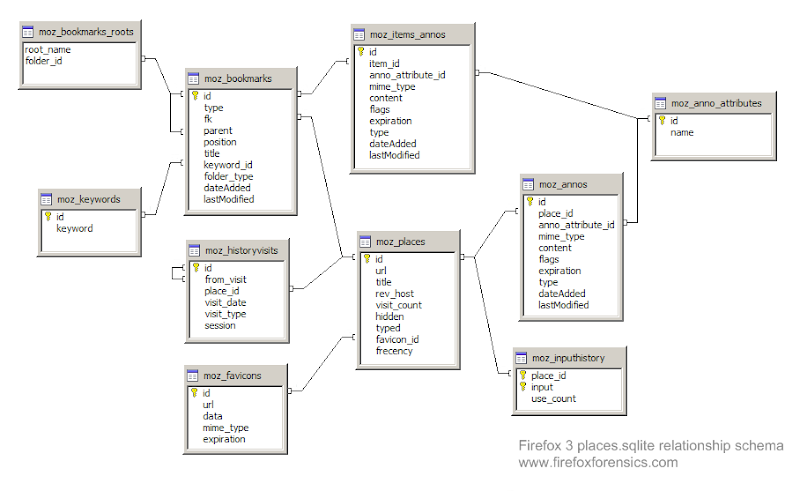
Firefox 從版本3開始,使用新的文件格式來儲存瀏覽的歷史紀錄,而不是把這些紀錄存於mork文件格式,紀錄改為保存在一個SQLite資料庫

文件位置(File Locations) Windows XP中 C:\Documents and Settings\<username>\Application Data\Mozilla\Firefox\Profiles\<profile folder>\places.sqlite Windows Vista C:\Users\<user>\AppData\Roaming\Mozilla\Firefox\Profiles\<profile folder>\places.sqlite GNU/Linux /home/<user>/.mozilla/firefox/<profile folder>/places.sqlite Mac OS X /Users/<user>/Library/Application Support/Firefox/Profiles/default.lov/places.sqlite

文件標頭(File Header) Firefox 3 history files start with 53 51 4C 69 74 65 20 66 6F 72 6D 61 74 20 33 which represents the ascii string SQLite format 3. This is normal for any Sqlite database file, so it may be more appropriate to verify that the file is a Firefox 3 history file by looking for the database tables within the file. For example, at offset 120701 (0x1D77D) the hex value 43 52 45 41 54 45 20 54 41 42 4C 45 20 6D 6F 7A 5F 62 6F 6F 6B 6D 61 72 6B 73 can be found. This represents the ascii string CREATE TABLE moz_bookmarks. At offset 120973 (0x1D88D) the hex value 43 52 45 41 54 45 20 49 4E 44 45 58 20 6D 6F 7A 5F 62 6F 6F 6B 6D 61 72 6B 73 5F 69 74 65 6D 69 6E 64 65 78 can be found. This represents the ascii string CREATE TABLE moz_bookmarks_itemindex.

資料庫表(Database Tables) The places.sqlite file is essentially a database with multiple tables: moz_anno_attributes moz_annos moz_bookmarks moz_bookmarks_roots moz_favicons moz_historyvisits moz_inputhistory moz_items_annos moz_keywords moz_places
參考來源:wiki
(繼續閱讀...)
文章標籤

Recover 發表在 痞客邦 留言(0) 人氣(83)

  • 個人分類:系統常識
▲top
12...11»

文章分類

  • 鑑識工具 (30)
  • 鑑識概述 (4)
  • 資料還原 (12)
  • 系統常識 (8)
  • 程序認證 (3)
  • 密碼破解 (5)
  • 教學資料 (11)
  • 惡意程式 (14)
  • 資訊安全 (4)
  • 其他工具 (15)
  • 資料還原 (2)
  • 未分類文章 (1)

熱門文章

  • (1,325)CHFI (Computer Hacking Forensic Investigator) 電腦駭客鑑識偵查員
  • (4,080)1.8吋固態硬碟,ZIF、LIF接口pATA硬碟和相關適配器(轉)
  • (1,209)X-Ways Forensics 快速入門
  • (10,255)Rainbow Hash Table 與密碼破解
  • (442)Intella Vs. Nuix Forensics Desktop 電子郵件分析工具簡述
  • (4,222)Final Data 3.0 專業版與 X-Ways forensics 檔案還原效果測試
  • (6,465)病毒加殼技術與脫殼殺毒方法
  • (3,672)資料完全銷毀手冊(上)
  • (1,243)資料完全銷毀手冊(中)

最新文章

  • 搬家啦~
  • 資料完全銷毀手冊(中)
  • 資料完全銷毀手冊(上)
  • CDRoller 8.70.80 光碟救援軟體
  • 國家級標準銷毀儲存媒體資料
  • Hiren's BootCD Pro 1.5
  • EVEREST Ultimate Edition 5.30.2009
  • CHFI (Computer Hacking Forensic Investigator) 電腦駭客鑑識偵查員
  • WinDD 1.3 簡介&下載
  • Mozilla Firefox 3 History File Format

文章精選

文章搜尋

誰來我家

人氣