PIXNET Logo登入

Invisible Man

跳到主文

電腦鑑識、資料救援、資料還原、惡意程式

部落格全站分類:數位生活

  • 相簿
  • 部落格
  • 留言
  • 名片
  • 4月 06 週一 200921:15
  • 使用 SPFDisk 來進行磁碟救援


天有不測風雲,電腦這種電子產品也難保長長久久。有時候硬碟難免因為不正常關機、病毒破壞、安裝作業系統時誤刪... 等等種種原因而導致硬碟分割表損毀,也使得硬碟裡的資料毀於一旦。 所謂的硬碟分割表損毀,指的像是電腦突然找不到開機磁區而無法開機、數個磁碟分割區憑空消失、或是硬碟分割表直接被清空了... 而使用 SPFDisk 之類的磁碟軟體來查看硬碟分割表時,發現硬碟分割表已經錯亂或是完全沒有資料,那很有可能就是遇到硬碟分割表損毀了。 但若只是硬碟分割表損毀,但硬碟裡的資料還安然無恙時,在試過種種方式還是無法回復原有的硬碟分割表時,您可以考慮使用 SPFDisk 來進行磁碟救援。筆者日前在安裝 FreeBSD 時,不知為何 F 槽和 G 槽都消失了,變成了『未使用空間』,就是經由以下步驟救回來的,過程不用 2 分鐘哦!
警告: 因為進行『磁碟救援』並無法保證絕對能完整救回您硬碟裡的資料,相反的,進行『磁碟救援』很有可能會反而使得您硬碟裡的資料一去不復返。您應該將『磁碟救援』視為最後的救援手段。非必要請勿輕易嘗試!

事前準備
如果您手上能有目前的磁碟分割表的資料,那麼在進行磁碟救援時將會事半功倍。 但是一般都是等到硬碟出問題了,才發現事前的預防是多麼的重要... 還好的是,SPFDisk 有一些內建的小工具可以幫助您找回舊有的磁碟分割表。 首先,進入 SPFDisk,並進入磁碟分割程式。在下圖中,您可以看到硬碟是全空的,完全沒有殘存的任何磁碟分割表資料。 這時,按下 鍵,就會出現一個工具選單。請按下【4. 處理開機物件】→【1. 搜尋開機物件】,如下圖:
SPFDisk_29.png
接下來它會詢問您【是否將結果存檔】。基本上是不太需要的:
SPFDisk_30.png
接下來它會詢問您【是否搜尋磁柱的每一個面】。如果按下【Y】的話,它會掃瞄每個磁柱的內容;如果按下【N】的話,它只會檢查磁柱的開頭部份。為了節省時間,您可以選擇【N】:
SPFDisk_31.png
最後搜尋結果出來了,的確找到了所有的磁區:
SPFDisk_32.png
請用紙筆將結果記下,在下個步驟中這些資料就可以派上用場了!
注: 請不要 100% 相信以上所掃瞄到的結果,我們並無法擔保 SPFDisk 真能找到所有的磁碟分割區。所以事前的預防工作真的很重要!
如何進行磁碟救援 有了正確的硬碟分割表,那麼進行磁碟救援的工作將會輕鬆許多。 為了能修正已損毀的硬碟分割表,您可以依您手上的硬碟分割表資訊,使用 SPFDisk 再一次寫入正確的硬碟分割表。 在設法回復擴充分割時,若是得到【發現殘存的邏輯分割表,是否嘗試寫入?】的資訊:
SPFDisk_33.png
就表示在您手上的硬碟分割表資訊裡的擴充分割部份應該是正確的。
注意:

若在回復擴充分割時,沒有出現【發現殘存的邏輯分割表,是否嘗試寫入?】這個資訊, 就表示在您手上的硬碟分割表資訊裡的擴充分割部份有可能是不正確的。 這時請勿任意將分割結果寫入硬碟裡,至少,請勿再分割任何的邏輯分割, 因為這很可能會損壞位於該擴充分割裡的資料。 建議您再試著其它方式來找出您的擴充分割的真正位址。
但還好的是,在上文中示範了如何使用 SPFDisk 來找出殘餘的邏輯分割區,如果沒有意外的話,按照 SPFDisk 所找到的邏輯分割區來劃分成功機率將會高出許多。
而主要分割區則沒有這個顧慮了...

將復原後的分割表寫回磁碟 設定好正確硬碟分割表後,按下 ,就會跳出 SPFDisk 的磁碟分割程式。這時它會詢問您是否要將變更寫入磁碟中:
SPFDisk_21.png
接下來它會再試確認您所要寫入的磁碟是否正確:
SPFDisk_22.png
這時,它會詢問您是否使用【破壞性儲存】。因為我們是在進行磁碟的救援,所以務必在此要選擇:【N】:
SPFDisk_23.png
注意: 若您在此選擇了【破壞性儲存】,將很可能會破壞硬碟裡原有的資料。不可不慎! 然後會出現以下畫面。由於我們在進行磁碟的救援,所以務必在此要選擇:【N】:
SPFDisk_24.png
然後它會詢問您是否建立 UNDO (還原) 檔:
SPFDisk_25.png
如果您有看到【分割表現已儲存完畢!】資訊,表示新的分割表已正確寫入了:
SPFDisk_26.png
然後就可以放心離開了:
SPFDisk_27.png
因為分割表已有所更動,您必須重新開機才能讓這些變更生效:
SPFDisk_28.png
這時,您可以開機試試是否所有的資料都已完全回復了!
重新開機測試 在小心得寫回正確的硬碟分割表後,您可以重新開機並確認在硬碟裡的資料是不是已全部回復了。如果還是沒辨法,您可能要檢查一下是否寫入了錯誤的分割表,或是試試其它的磁碟救援方式。
轉自http://tetralet.luna.com.tw/index.php?op=ViewArticle&articleId=43&blogId=1
(繼續閱讀...)
文章標籤

Recover 發表在 痞客邦 留言(0) 人氣(869)

  • 個人分類:資料還原
▲top
  • 4月 03 週五 200918:49
  • MBR磁區詳解


說明:硬盤主引導記錄獨立於操作系統,但又和操作系統息息相關——很多時候它又是由 ; 操作系統所提供的工具所生成(例外的情況是您使用了其他的分區工具,不過它又運行在 ; 什麼操作系統中呢?;()。 ; ; 如果您安裝了Windows 98(我現在暫時不能接觸95下的主引導記錄,總不能用95重裝我的 ; 系統吧?)操作系統,那您機器上的主引導記錄已經與以前的大有不同了,通過下面的分析 ; 您一定能對Windows 98為什麼要更改主引導記錄有所瞭解——它已經開始支持擴展Int13h ; 了!並且這個主引導記錄的編程技巧更是我們應該學習的。 ; ; 主引導記錄包括代碼、數據兩部分。它在被BIOS中斷Int19h裝入內存後獲得控制權。數據 ; 部分最重要的當然是分區表了!徹底熟悉主引導記錄,可以幫助我們瞭解系統的引導過程, ; 處理因主引導記錄損壞所造成的無法引導故障,消除引導型計算機病毒,更使我們能通過 ; 修改主引導記錄完成我們希望的工作:如多重引導,系統加軟鎖等... ; ; BIOS中斷總是把主引導記錄所在扇區(硬盤的0頭0道1扇區)的內容(包括代碼和數據) ; 裝入內存0000:7C00起始的區域,然後檢驗該扇區內容的最後兩個字節是不是「AA55」, ; 如果不是,那麼對不起,Int19h將不把控制權交給主引導記錄;若是,則下面的主引導記錄 ; 才能獲得了控制權了(Int19通過跳轉指令交轉控制權): ; ; 二進制形式的主引導記錄: 0000:0600 33 C0 8E D0 BC 00 7C FB-50 07 50 1F FC BE 1B 7C 3.....|.P.P....| 0000:0610 BF 1B 06 50 57 B9 E5 01-F3 A4 CB BE BE 07 B1 04 ...PW........... 0000:0620 38 2C 7C 09 75 15 83 C6-10 E2 F5 CD 18 8B 14 8B 8,|.u........... 0000:0630 EE 83 C6 10 49 74 16 38-2C 74 F6 BE 10 07 4E AC ....It.8,t....N. 0000:0640 3C 00 74 FA BB 07 00 B4-0E CD 10 EB F2 89 46 25 <.t...........F% 0000:0650 96 8A 46 04 B4 06 3C 0E-74 11 B4 0B 3C 0C 74 05 ..F...<.t...<.t. 0000:0660 3A C4 75 2B 40 C6 46 25-06 75 24 BB AA 55 50 B4 :.u+@.F%.u$..UP. 0000:0670 41 CD 13 58 72 16 81 FB-55 AA 75 10 F6 C1 01 74 A..Xr...U.u....t 0000:0680 0B 8A E0 88 56 24 C7 06-A1 06 EB 1E 88 66 04 BF ....V$.......f.. 0000:0690 0A 00 B8 01 02 8B DC 33-C9 83 FF 05 7F 03 8B 4E .......3.......N 0000:06A0 25 03 4E 02 CD 13 72 29-BE 2D 07 81 3E FE 7D 55 %.N...r).-..>.}U 0000:06B0 AA 74 5A 83 EF 05 7F DA-85 F6 75 83 BE 1A 07 EB .tZ.......u..... 0000:06C0 8A 98 91 52 99 03 46 08-13 56 0A E8 12 00 5A EB ...R..F..V....Z. 0000:06D0 D5 4F 74 E4 33 C0 CD 13-EB B8 00 00 80 49 12 00 .Ot.3........I.. 0000:06E0 56 33 F6 56 56 52 50 06-53 51 BE 10 00 56 8B F4 V3.VVRP.SQ...V.. 0000:06F0 50 52 B8 00 42 8A 56 24-CD 13 5A 58 64 10 72 PR..B.V$..ZX.d.r 0000:0700 0A 40 75 01 42 80 C7 02-E2 F7 F8 5E C3 EB 74 B7 .@u.B......^..t. 0000:0710 D6 C7 F8 B1 ED CE DE D0-A7 00 BC D3 D4 D8 B2 D9 ................ 0000:0720 D7 F7 CF B5 CD B3 CA B1-B3 F6 B4 ED 00 4D 69 73 .............Mis 0000:0730 73 69 6E 67 20 6F 70 65-72 61 74 69 6E 67 20 73 sing operating s 0000:0740 79 73 74 65 6D 00 00 00-00 00 00 00 00 00 00 00 ystem........... 0000:0750 00 00 00 00 00 00 00 00-00 00 00 00 00 00 00 00 ................ 0000:0760 00 00 00 00 00 00 00 00-00 00 00 00 00 00 00 00 ................ 0000:0770 00 00 00 00 00 00 00 00-00 00 00 00 00 00 00 00 ................ 0000:0780 00 00 00 8B FC 1E 57 8B-F5 CB 00 00 00 00 00 00 ......W......... 0000:0790 00 00 00 00 00 00 00 00-00 00 00 00 00 00 00 00 ................ 0000:07A0 00 00 00 00 00 00 00 00-00 00 00 00 00 00 00 00 ................ 0000:07B0 00 00 00 00 00 00 00 00-86 D8 00 00 00 00 80 01 ................ 0000:07C0 01 00 06 3F 3F FD 3F 00-00 00 41 A0 0F 00 00 00 ...??.?...A..... 0000:07D0 01 FE 05 3F FF FE 80 A0-0F 00 C0 4F 2F 00 00 00 ...?.......O/... 0000:07E0 00 00 00 00 00 00 00 00-00 00 00 00 00 00 00 00 ................ 0000:07F0 00 00 00 00 00 00 00 00-00 00 00 00 00 00 55 AA ..............U. ; ; 反彙編結果 ; ; 0000:7C00~0000:7C1A:初始化各個段寄存器、堆棧指針,最後將主引導記錄在內存中搬家,騰出其所佔內 ; 存空間以供裝入分區引導記錄。 0000:7C00 33C0 XOR AX,AX ;AX寄存器清0 0000:7C02 8ED0 MOV SS,AX ;SS=0 0000:7C04 BC007C MOV SP,7C00 ;裝填棧指針——SS:SP=0000:7C00 0000:7C07 FB STI ;開中斷(裝填棧指針時為避免硬件中斷引起棧混亂應關中斷) 0000:7C08 50 PUSH AX ; 0000:7C09 07 POP ES ;裝填附加數據段寄存器ES=0 0000:7C0A 50 PUSH AX ; 0000:7C0B 1F POP DS ;裝填數據段寄存器DS=0 0000:7C0C FC CLD ;規定其後的串操作為正向串操作 0000:7C0D BE1B7C MOV SI,7C1B ;源指針 0000:7C10 BF1B06 MOV DI,061B ;目的指針 0000:7C13 50 PUSH AX ; 0000:7C14 57 PUSH DI ;看看0000:7C1A——構造一個跳轉 0000:7C15 B9E501 MOV CX,01E5 ; 0000:7C18 F3 REPZ ; 0000:7C19 A4 MOVSB ;0000:7C1B起始的CX字節傳送至0000:061B起始的區域 0000:7C1A CB RETF ;跳轉到0000:061B(這是一種技巧跳轉) ; ; 為直觀起見,下面的地址按實際運行時的地址給出。 ; 0000:061B~0000:062B:對分區表進行初步檢驗,一旦檢測到某分區表項狀態字節大於等於80h,就通過(當 ; 然,在此之前如果檢測到某項分區表的狀態字節小於80h,就轉錯誤處理。當然,如果四個分區項的狀態字節 ; 都為零,主引導記錄就會調用BIOS-ROM的INT 18h,顯示"PRESS A KEY TO REBOOT"信息等待你的操作。 0000:061B BEBE07 MOV SI,07BE ;SI指向第一個分區表項,這時CX=0 0000:061E B104 MOV CL,04 ;分區表共四個表項 0000:0620 382C CMP [SI],CH ; 0000:0622 7C09 JL 062D ;大於等於80h轉[注意JL指令:(SF xor OF)=1則轉] 0000:0624 7515 JNZ 063B ;不為0則[SI]一定小於80h,只能轉錯誤處理了! 0000:0626 83C610 ADD SI,+10 ;為零則檢查下一表項 0000:0629 E2F5 LOOP 0620 ;檢查下一表項 0000:062B CD18 INT 18 ;四表項的狀態字節都為0,則系統只好調用INT 18h了! ; ; 0000:062D~0000:0639:檢查剩餘的分區表項——狀態字節必須為零,否則顯示錯誤信息「分區表無效」然 ; 後當機!拜託,微軟搞錯沒有,怎麼用中文提示信息?真TM傻得可愛! ; 這裡還有個小BUG,前面放行原則是只要狀態字節大於等於80h,那麼如果這個字節是諸如A0h、E5h之類數值 ; 呢?嘿嘿,這個引導記錄統統認為是有效的可引導分區了! 0000:062D 8B14 MOV DX,[SI] ;為讀分區引導記錄做準備:磁頭號→DH,驅動器號→DL 0000:062F 8BEE MOV BP,SI ;SI→BP,保存可引導分區表項的指針 ; 0000:0631 83C610 ADD SI,+10 ;其餘的分區表項還要檢查檢查的 0000:0634 49 DEC CX ; 0000:0635 7416 JZ 064D ;CX=0則檢查順利通過,轉繼續 0000:0637 382C CMP [SI],CH ; 0000:0639 74F6 JZ 0631 ;為零,是合法表項,再查下一表項 ; ; 0000:063B~0000:064B:執行錯誤處理——報告錯誤信息後當機 0000:063B BE1007 MOV SI,0710 ;錯誤信息字符串偏移+1→SI 0000:063E 4E DEC SI ;SI-1→SI 0000:063F AC LODSB ;SI+1→SI 0000:0640 3C00 CMP AL,00 ; 0000:0642 74FA JZ 063E ;AL=0則表明一條錯誤信息顯示完畢,系統陷入一個死循環 0000:0644 BB0700 MOV BX,0007 ;字符方式顯示 0000:0647 B40E MOV AH,0E ; 0000:0649 CD10 INT 10 ;以寫電傳方式顯示信息(只顯示一個字符) 0000:064B EBF2 JMP 063F ;顯示下一個字符,直到遇到提示信息結束為止 ; ; 0000:064D~0000:0662:判斷可引導分區的分區類型,然後轉相應處理程序。 0000:064D 894625 MOV [BP+25],AX ;BP=指向第一個可引導分區表項的指針,這時AX=0000h ;使用長度最短的指令將[BP+25]起始的兩個單元清零 ;這兩個單元將被用來存放中間變量 0000:0650 96 XCHG SI,AX ;此時SI清零的最佳指令選擇(僅1字節),將服務於0000:06B8 0000:0651 8A4604 MOV AL,[BP+04] ;取分區類型(本例是「06」嘍——FAT16主DOS分區) 0000:0654 B406 MOV AH,06 ;為擴展INT 13h無法使用做好更改分區類型的準備 0000:0656 3C0E CMP AL,0E ;0Eh:需要用擴展INT 13h訪問的FAT16主DOS分區 0000:0658 7411 JZ 066B ;0Eh類型的分區轉066Bh 0000:065A B40B MOV AH,0B ; 0000:065C 3C0C CMP AL,0C ;0Ch:需要用擴展INT 13h訪問的FAT32分區 0000:065E 7405 JZ 0665 ;0Ch類型的分區轉0665h先行預處理 0000:0660 3AC4 CMP AL,AH ;0Bh:用傳統INT 13h就可以訪問的FAT32分區 0000:0662 752B JNZ 068F ;其他類型的分區轉068Fh ; ; 0000:0664~0000:06A1:根據分區類型和分區表表項內容進行讀取分區引導記錄前的處理工作 0000:0664 40 INC AX ;★★★0Bh類型的分區由此開始處理,此條指令用意是清ZF位 0000:0665 C6462506 MOV BYTE PTR [BP+25],06 ;★★★0Ch類型的分區由此開始處理 ;為什麼取值06,一時沒有自圓我說的解釋,請耐心幾天吧。 0000:0669 7524 JNZ 068F ;請注意上面指令對ZF位的影響:0Bh類型分區轉,0Ch則不轉 ; 0000:066B~0000:068C這段代碼僅當分區類型是0Ch、0Eh才有獲得執行的機會 0000:066B BBAA55 MOV BX,55AA ;★★★0Eh類型的分區由此開始處理 0000:066E 50 PUSH AX ; 0000:066F B441 MOV AH,41 ;擴展INT 13h功能,檢測BIOS是否已經支持擴展INT13h 0000:0671 CD13 INT 13 ;入口參數:BX=55AAh,DL=驅動器號,AH=41h 0000:0673 58 POP AX ;執行完恢復AX為060Eh 0000:0674 7216 JB 068C ;不支持則轉 0000:0676 81FB55AA CMP BX,AA55 ; 0000:067A 7510 JNZ 068C ;擴展INT13h不可用也轉 0000:067C F6C101 TEST CL,01 ;測試擴展盤訪問是否被支持 0000:067F 740B JZ 068C ;不支持還轉 ; 因為擴展INT13h方式讀盤與標準INT13h方式讀盤有很大差別,所以0000:0686處指令修改其後的代碼以保證按 ; 照擴展讀方式讀分區引導扇區時能正確跳轉到相應的處理程序中。 0000:0681 8AE0 MOV AH,AL ;分區類型→AH 0000:0683 885624 MOV [BP+24],DL ;保存驅動器號→[BP+24] 0000:0686 C706A106EB1E MOV WORD PTR [06A1],1EEB ;修改0000:06A1處代碼為"JMP 06C1" 0000:068C 886604 MOV [BP+04],AH ;注意:如果擴展INT13h不能使用則A改分區類型為06,但如果 ;擴展INT13h能使用,則仍保持原分區類型不變 0000:068F BF0A00 MOV DI,000A ;★★★其它類型分區由此開始處理。此條指令初始化計數器 0000:0692 B80102 MOV AX,0201 ;AH:讀操作,AL:讀取1個扇區的內容 0000:0695 8BDC MOV BX,SP ;SP=7C00→BX,指定分區引導記錄裝入內存的位置偏移 0000:0697 33C9 XOR CX,CX ;CX清零 0000:0699 83FF05 CMP DI,+05 ;注意5 0000:069C 7F03 JG 06A1 ;大於則轉去讀由分區表指定的分區引導扇區 0000:069E 8B4E25 MOV CX,[BP+25] ;小於則證明所讀分區表指定的引導扇區無合法的引導記錄, ;改按???再讀,畢竟多一種選擇多一次機會嘛!;) ; 以下標有(1)(2)者請注意它們的地址都是一樣的,就是說實際運行中只可能是二者之一,但為了分析之方便,我 ; 把兩者都列了出來以供對比,閱讀時千萬別看成是兩條指令了啊! (1)0000:06A1 034E02 ADD CX,[BP+02] ;獲取分區引導扇區所在的柱面號和物理扇區號 (2)0000:06A1 EB1E JMP 06C1 ;如果分區類型是0Ch、0Eh而且擴展讀能使用則執行該指令 ; ; 0000:06A4:將可引導分區的分區引導記錄裝入內存指定區域 ; 入口參數:AH=功能號,02為讀盤操作;AL=一次讀取的扇區數 ; ES:BX=讀入內存的起始地址 ; CH=10位柱面號的低8位;CL:高兩位是10位柱面號的高兩位,低6位是物理扇區號 ; DH=磁頭號;DL=驅動器號,最高位(即位7)為0是軟盤,為1是硬盤 0000:06A4 CD13 INT 13 ;讀分區引導記錄到0000:7C00起始的區域 ; ; 0000:06A6 7229 JB 06D1 ;不成功轉 0000:06A8 BE2D07 MOV SI,072D ;錯誤信息字符串偏移→SI 0000:06AB 813EFE7D55AA CMP WORD PTR [7DFE],AA55 ;分區引導記錄合法嗎? 0000:06B1 745A JZ 070D ;合法則轉(這是主引導記錄唯一的正常出口) 0000:06B3 83EF05 SUB DI,+05 ;不合法則為換讀其他扇區做準備 0000:06B6 7FDA JG 0692 ;只有一次換讀扇區的機會! ; ; 0000:06B8~0000:06BF:錯誤預處理 0000:06B8 85F6 TEST SI,SI ;測試SI值是否為0,其意義在於確定該顯示哪條信息 0000:06BA 7583 JNZ 063F ;不為0則轉錯誤處理,顯示「Missing operating system」 0000:06BC BE1A07 MOV SI,071A ;錯誤信息字符串偏移→SI 0000:06BF EB8A JMP 064B ;轉錯誤處理,顯示「加載操作系統時出錯」 ; ; 0000:06C1~0000:06CF:整理擴展讀所需入口參數,然後調用擴展讀子程序 ; 這段代碼只有在以擴展讀方式讀取分區引導記錄時才有機會獲得執行 0000:06C1 98 CBW ;轉換字節AL為字AX,執行後,AX中是一次要讀的扇區數 0000:06C2 91 XCHG CX,AX ;AX→CX,CX→AX,執行後,CX中是一次要讀的扇區數 0000:06C3 52 PUSH DX ; 0000:06C4 99 CWD ;將字AX轉換為雙字→DX,AX 0000:06C5 034608 ADD AX,[BP+08] ; 0000:06C8 13560A ADC DX,[BP+0A] ;執行後,DX:AX=LBA絕對物理扇區號 0000:06CB E81200 CALL 06E0 ;調用擴展讀子程序 0000:06CE 5A POP DX ; 0000:06CF EBD5 JMP 06A6 ; ; ; 0000:06D1~0000:06D8分區引導記錄裝入失敗時的處理 0000:06D1 4F DEC DI ;計數器減1 0000:06D2 74E4 JZ 06B8 ;五次讀盤均未成功則轉錯誤處理(注意這時SI=0) 0000:06D4 33C0 XOR AX,AX ;置功能號 0000:06D6 CD13 INT 13 ;復位磁盤系統 0000:06D8 EBB8 JMP 0692 ;再讀 ; ; 0000:06DA 00 00 80 49 12 00 ...I.. ; ; 0000:06E0~0000:070C:使用擴展INT 13h功能讀取分區引導記錄的子程序 ; 調用時,SP=7BFE。這段程序利用壓棧寄存器方式構造了一個磁盤地址包,請注意體會。另外,0000:06FC處 ; 的一條指令就釋放了幾乎全部由本段程序佔用的棧空間,構思之巧妙,絕對需要我們學習! ; 所以,分析該段程序,一個重點應放在棧的變化上。 0000:06E0 56 PUSH SI ;保存SI——注意,這次壓棧並不構造磁盤地址包 0000:06E1 33F6 XOR SI,SI ;清零 0000:06E3 56 PUSH SI ; 0000:06E4 56 PUSH SI ; 0000:06E5 52 PUSH DX ; 0000:06E6 50 PUSH AX ;以上四條指令壓棧的是扇區LBA號碼*2 0000:06E7 06 PUSH ES ;壓棧內存目標緩衝區首址段址 0000:06E8 53 PUSH BX ;壓棧內存目標緩衝區首址偏移 0000:06E9 51 PUSH CX ;壓棧所讀扇區數 0000:06EA BE1000 MOV SI,0010 ;注意SI的高8位對應著磁盤地址包的保留字節,必須為0 0000:06ED 56 PUSH SI ;壓棧磁盤地址包包長,執行完本條指令一個包已經構造完畢 0000:06EE 8BF4 MOV SI,SP ;規定磁盤地址包偏移指針,這時SP=7BEA 0000:06F0 50 PUSH AX ;保存AX 0000:06F1 52 PUSH DX ;保存DX 0000:06F2 B80042 MOV AX,4200 ;置擴展讀功能號 0000:06F5 8A5624 MOV DL,[BP+24] ;取驅動器號,參照0000:0683 ; 入口參數:AH=功能號,02為讀盤操作;DL=驅動器號 ; DS:SI=16字節磁盤地址包——第0字節:包長度(固定為10h);第1字節:保留,必須為0; ; 第2、3字節:所讀扇區數;第4~5字節:內存目標緩衝區首址偏移; ; 第6~7字節:內存目標緩衝區首址段址; 第8~15字節:扇區LBA號碼 ; 出口參數:成功則AH=0;錯誤則AH=錯誤代碼 0000:06F8 CD13 INT 13 ;執行擴展讀操作 0000:06FA 5A POP DX ; 0000:06FB 58 POP AX ; 0000:06FC 8D6410 LEA SP,[SI+10] ;7BEA+10h=7BFA→SP(注意是取偏移而不是取單元內容) 0000:06FF 720A JB 070B ;擴展讀不成功轉 0000:0701 40 INC AX ; 0000:0702 7501 JNZ 0705 ; 0000:0704 42 INC DX ;AX加1溢出時(比如0FFFFh+1)DX才加1 0000:0705 80C702 ADD BH,02 ;調整BX,使偏移量增加512字節(剛好一扇區) 0000:0708 E2F7 LOOP 0701 ;0701~0708一段代碼暫未明白其真實意圖! 0000:070A F8 CLC ; 0000:070B 5E POP SI ; 0000:070C C3 RET ; ; ; 0000:070D:中繼跳轉 0000:070D EB74 JMP 0783 ; ; ; 070F~0745是錯誤信息!果然是中文Windows98生成的主引導記錄,所以我要特別 ; 「感謝」微軟這個傻B,真難為它竟然用中文表述前兩個信息!可惜真需顯示的時 ; 候鬼才能看懂是什麼呢!!!我K!——耍弄我們耶!? ; 070F~0718:「分區表無效」中文信息 ; 071A~072B:「加載操作系統時出錯」中文信息 ; 072D~0744:「Missing operating system」英文信息 0000:070F B7 . 0000:0710 D6 C7 F8 B1 ED CE DE D0-A7 00 BC D3 D4 D8 B2 D9 ................ 0000:0720 D7 F7 CF B5 CD B3 CA B1-B3 F6 B4 ED 00 4D 69 73 .............Mis 0000:0730 73 69 6E 67 20 6F 70 65-72 61 74 69 6E 67 20 73 sing operating s 0000:0740 79 73 74 65 6D 00 00 00-00 00 00 00 00 00 00 00 system.......... 0000:0750 00 00 00 00 00 00 00 00-00 00 00 00 00 00 00 00 ................ 0000:0760 00 00 00 00 00 00 00 00-00 00 00 00 00 00 00 00 ................ 0000:0770 00 00 00 00 00 00 00 00-00 00 00 00 00 00 00 00 ................ 0000:0780 00 00 00 ... ; ; 0000:0783~0000:0789:控制權移交 0000:0783 8BFC MOV DI,SP ; 0000:0785 1E PUSH DS ; 0000:0786 57 PUSH DI ;構造一個跳轉地址 0000:0787 8BF5 MOV SI,BP ; 0000:0789 CB RETF ;交控制權給分區引導記錄(0000:7C00) ; ; 0000:078A 00 00 00 00 00 00 ...... 0000:0790 00 00 00 00 00 00 00 00-00 00 00 00 00 00 00 00 ................ 0000:07A0 00 00 00 00 00 00 00 00-00 00 00 00 00 00 00 00 ................ ; ; 07B8~07BB四個字節的內容用於什麼呢?(不同機器此四字節均不同) ; 07BE~07FD為分區表,內含四個分區表項(每表項10h字節) 0000:07B0 00 00 00 00 00 00 00 00-86 D8 00 00 00 00 80 01 ................ 0000:07C0 01 00 06 3F 3F FD 3F 00-00 00 41 A0 0F 00 00 00 ...??.?...A..... 0000:07D0 01 FE 05 3F FF FE 80 A0-0F 00 C0 4F 2F 00 00 00 ...?.......O/... 0000:07E0 00 00 00 00 00 00 00 00-00 00 00 00 00 00 00 00 ................ 0000:07F0 00 00 00 00 00 00 00 00-00 00 00 00 00 00 55 AA ..............U. *1:因為物理扇區號總是從1排列而起 *2:由此可見,就是使用LBA擴展讀的功能,主引導記錄卻限制了分區引導扇區必須在LBA絕對物理扇區0FFFFFFFFh之前才有可能從該分區引導系統!
(繼續閱讀...)
文章標籤

Recover 發表在 痞客邦 留言(0) 人氣(566)

  • 個人分類:資料還原
▲top
  • 4月 03 週五 200918:41
  • BMP檔案格式詳解


原文出處:瘋小貓的華麗冒險 作者:瘋小貓
由於工作需要,研究了一下點陣圖的檔案格式。發現網路上的資料大多不夠齊全,或者範例太含糊。我將所有找到的資料消化/整理/翻譯之後如下,希望對需要的人有幫助:
*******************************************
《簡介》
點 陣圖(bitmap)格式是 Windows 採用的圖像檔案儲存格式,在 Windows 環境下運行的所有圖像處理軟件都支持這種格式。Windows 3.0 以前的 BMP 格式與顯示設備有關,因此稱為設備相關點陣圖(Device-Dependent Bitmap, DDB)格式。Windows 3.0 以後的 BMP 格式則與顯示設備無關(Device-Independent Bitmap, DIB),目的是為了讓 Windows 能夠在任何類型的顯示設備上顯示點陣圖檔案。點陣圖檔案的預設副檔名是 BMP 或 bmp。
*******************************************
《點陣圖檔案結構》
點陣圖檔案由四個部份組成:
  • Bitmap File Header
  • Bitmap Info Header
  • Color Table (Palette)
  • Bitmap Array
  • Note: 以下欄位資料皆為 little-endian! Little-Endian 的意思是:若某個欄位值為 0x1234,當你將BMP檔案用 UltraEdit 之類的純文字編輯器打開時,則你看到的值會是 0x3412,這是 Intel 制定的儲存方式,把值小的位元組(0x34)存在前面;詳情可參考 Big Endian 和 Little Endian 架構的說明
      Shift Name Size
    (bytes) ContentBitmap
    File
    Header 0000h Identifier (ID) 2 'BM'【註1】 0002h File Size 4 整個點陣圖檔案的大小(單位:byte) 0006h Reserved 4 保留欄位 000Ah Bitmap Data Offset 4 點陣圖資料開始之前的偏移量(單位:byte)Bitmap
    Info
    Header 000Eh Bitmap Header Size 4 Bitmap Info Header 的長度【註2】 0012h Width 4 點陣圖的寬度,以像素(pixel)為單位 0016h Height 4 點陣圖的高度,以像素(pixel)為單位【註3】
    001Ah Planes 2 點陣圖的位元圖層數【註4】 001Ch Bits Per Pixel 2 每個像素的位元數
    1:單色點陣圖(使用 2 色調色盤)
    4:4 位元點陣圖(使用 16 色調色盤)
    8:8 位元點陣圖(使用 256 色調色盤)
    16:16 位元高彩點陣圖(不一定使用調色盤)
    24:24 位元全彩點陣圖(不使用調色盤)
    32:32 位元全彩點陣圖(不一定使用調色盤)
    【註5】
    001Eh Compression 4 壓縮方式【註6】:
    0:未壓縮
    1:RLE 8-bit/pixel
    2:RLE 4-bit/pixel
    3:Bitfields
    0022h Bitmap Data Size 4 點陣圖資料的大小(單位:byte)【註7】。 0026h H-Resolution 4 水平解析度(單位:像素/公尺)【註8】 002Ah V-Resolution 4 垂直解析度(單位:像素/公尺) 002Eh Used Colors 4 點陣圖使用的調色盤顏色數【註9】 0032h Important Colors 4 重要的顏色數【註10】Palette 0036h Palette N*4 調色盤資料。
    每個索引值指定一種顏色:0x00RRGGBB
    其中最高位元組保留為零Bitmap
    Array - Bitmap Data - 點陣圖資料【註11】【註1】此欄原本有多種識別碼,用來識別點陣圖的類型:
        'BM' - Windows 3.1x, 95, NT, ...
        'BA' - OS/2 Bitmap Array
        'CI' - OS/2 Color Icon
        'CP' - OS/2 Color Pointer
        'IC' - OS/2 Icon
        'PT' - OS/2 Pointer
        不過既然 OS/2 並不普及,目前皆在 Windows 上作業,因此 ID 全都是 'BM'。
    【註2】此欄原本有多種數值,依作業系統種類而定:
        28h - Windows 3.1x, 95, NT, ...
        0Ch - OS/2 1.x
        F0h - OS/2 2.x
        以目前 Windows 常用的點陣圖來說,此欄位數值通常是 28h。
        但因為微軟已經制定出了新的點陣圖格式,其中的 Bitmap Info Header 結構變化較大,長度加長,所以最好不要直接使用常數 28h,而是應該從實際檔案中讀取這個數值,才能確保程式相容性。【註3】高度可能為負值,負值表示掃瞄方向由上而下。
        但若高度是負值時,此點陣圖將不能被壓縮!(也就是說 Compression 欄位總是為 0)【註4】未知的功能...永遠被設為 1。【註5】16 及 32 位元點陣圖是否使用調色盤必須由 Compression 欄位的數值決定,
        請參考 Bitfields 的解說。【註6】點陣圖壓縮方式有以下四種:BI_RGB,BI_RLE8,BI_RLE4,以及BI_BITFIELDS。
  • None (BI_RGB)
    表示此點陣圖資料沒有壓縮,不使用調色盤。

  • RLE 8bpp (BI_RLE8)
    每個像素為 8 bit 的 RLE 壓縮編碼(Run-Length Encoding)(總共可使用 256 色)。
    有「編碼模式」(Encoded Mode)和「絕對模式」(Absolute Mode)兩種方法,
    可在同一幅圖檔中的任何地方交錯使用。
    「編碼模式」:由兩個位元組(byte)組成。
           第一個位元組指定 "Length"(使用相同顏色的像素數目),
           第二個位元組指定 "Run"(此像素使用的調色盤索引)。
           若第一個位元組為零,則表示特殊意義:
           0x0000 - 表示此列結束
           0x0001 - 表示此點陣圖檔案結束
           0x0002 - 表示其後的兩位元組分別表示
                 下個像素位置與目前像素位置的水平/垂直偏移量。
           0x000x - 表示絕對模式。
    「絕對模式」:第一個位元組為 0x00,第二個位元組為 0x03 ~ 0xFF 之間的數值。
           其中第二個位元組表示後續資料的長度(單位為 byte),
           後續資料的每個位元組都表示單一像素的調色盤索引值。
    每一模式的編碼長度都必須與字邊界對齊(word-aligned),也就是 2 的倍數。
    使用「編碼模式」時,由於每組編碼皆為兩個位元組,所以毋需多加處理;
    但是使用「絕對模式」時,則必須在最後補上適當的 0x00 以使資料長度對齊 2 的倍數。
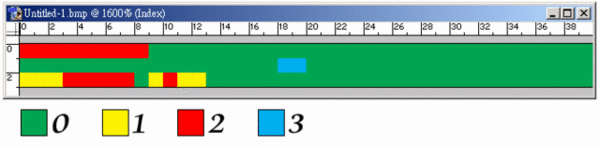
    下面是一個 BI_RLE8 的例子:
    03 01 05 02 00 03 00 01 02 00 02 01 00 02 05 01 02 03 00 00 09 02 00 01
    這些資料可解讀為:
    壓縮資料 解壓縮之後的資料
    03 01 01 01 01
    05 02 02 02 02 02 02
    00 03 00 01 02 00 00 01 02(最後的 00 是為了 word-aligned 才補上的)
    02 01 01 01
    00 02 05 01 從目前位置右移 5 像素之後,向下移一列
    02 03 03 03
    00 00 此列結束
    09 02 02 02 02 02 02 02 02 02 02
    00 01 此點陣圖結束

    上述資料的圖形如下:

  • RLE 4bpp (BI_RLE4)
    每個像素為 4-bit 的 RLE 壓縮編碼(總共可使用 16 色)。
    同樣也有「編碼模式」與「絕對模式」,且可以在同一圖檔中任何地方使用任一模式。
    「編碼模式」:由兩個位元組組成。
           第一個位元組指定像素數目,
           第二個位元組包含兩個調色盤索引:
           第一個像素使用高 4 位元的索引值、
           第二個像素使用低 4 位元的索引值、
           第三個像素又使用高 4 位元的索引值,以此類推。
           若第一個位元組為零,則表示特殊意義:
           0x0000 - 表示此列結束
           0x0001 - 表示此點陣圖檔案結束
           0x0002 - 表示其後的兩位元組分別表示
                 下個像素位置與目前像素位置的水平/垂直偏移量。
           0x000x - 表示絕對模式。
    「絕對模式」:第一個位元組為 0x00,第二個位元組表示後續資料的長度(單位為 byte)。
           後續資料的每個位元組都含有兩個調色盤索引值(高 4 及低 4 位元),
           每個索引值對應一個像素。
    每一模式的編碼長度仍然必須與字邊界對齊(word-aligned)。
    使用「編碼模式」時,由於每組編碼皆為兩個位元組,所以毋需多加處理;
    但是使用「絕對模式」時,則必須在最後補上適當的 0 以使資料長度對齊 2 的倍數。
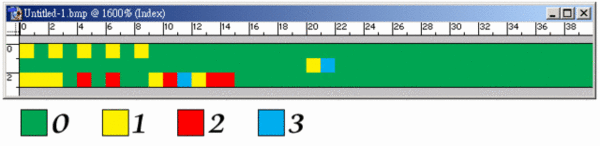
    下面是一個 BI_RLE4 的例子:
    03 11 05 02 00 05 01 23 10 00 02 22 00 02 05 01 02 13 00 00 09 10 00 01
    這些資料可解讀為:
    壓縮資料 解壓縮之後的資料
    03 11 1 1 1
    05 02 0 2 0 2 0
    00 05 01 23 10 00 0 1 2 3 1(最後的 0 00 是為了 word-aligned 才補上的)
    02 22 2 2
    00 02 05 01 從目前位置右移 5 像素之後,向下移一列
    02 13 1 3
    00 00 此列結束
    09 10 1 0 1 0 1 0 1 0 1
    00 01 此點陣圖結束

    上述資料的圖形如下:

  • Bitfileds (BI_BITFIELDS)
    只有當「Bit Per Pixel」欄位的數值為 16 或 32 時,才會使用 BI_BITFIELDS 這種格式。
    使用 BI_BITFIELDS 時,點陣圖檔中原本的調色盤位置會被三個 DWORD 佔據,
    分別代表 R、G、B 三個顏色分量的遮罩(mask)。
    例如:
    1. Bit_Per_Pixel = 16, Compression = BI_RGB(無壓縮),
      則每個像素的 16 位元之中:
      最低 5 位元表示藍色分量,
      中間 5 位元表示綠色分量,
      接著的高 5 位元則是紅色分量,
      最高的 1 位元保留不使用。
      此格式即為 RGB555 格式。
    2. Bit_Per_Pixel = 16, Compression = BI_BITFIELDS,
      紅、綠、藍的 mask 分別為 0xF800, 0x07E0, 0x001F,
      則每個像素的 16 位元之中:
      最低 5 位元表示藍色分量,
      中間 6 位元表示綠色分量,
      最高 5 位元則是紅色分量,
      此格式即為 RGB565 格式。
  • 【註7】若沒有壓縮(Compression 欄位為 0),則此欄數值可設為 0。
        (我發現許多繪圖軟體根本不看此欄數值,隨便填寫也無所謂,圖檔仍可正常開啟)【註8】若要換算為 dpi,則將此欄數值要除以39.37(吋/公尺)
        例如,此欄數值若為 2834 (pixels per meter),
        則 2834 ÷ 39.37 = 72 (pixels per inch) = 72 dpi【註9】此欄表示圖檔實際使用的顏色數目,若數值為 0,表示使用所有調色盤顏色。
        如果此欄數值並非「可用顏色的最大值」或者「零」,則需注意調色盤尺寸的計算。

        例如,在 4 bpp bitmap 中,調色盤預設尺寸應是 16*4 bytes,
        但若 Used Color 欄位數值並非 16 或 0,則調色盤尺寸應是 Used_Color_Number * 4 (bytes)。【註10】當此欄的值等於「顏色數」或者為 0 時,表示所有顏色都一樣重要。【註11】緊跟在調色盤之後的就是點陣圖資料陣列。
        每一掃描列的長度取決於圖檔的寬度及顏色深度(Color Depth),
        但是每一掃描列的長度必需是 4 byte 的倍數(DWORD-aligned)!
        正常的點陣圖掃描列是由底向上儲存的:
        陣列中的第一個 byte 表示全圖左下角的像素,而最後一個 byte 則表示全圖右上角的像素。
        但如果是正向掃描(Height 欄位為負值),則掃描方向則是由上而下。
    轉自http://crazycat1130.pixnet.net/blog/post/1345538
    (繼續閱讀...)
    文章標籤

    Recover 發表在 痞客邦 留言(0) 人氣(270)

    • 個人分類:資料還原
    ▲top
    • 4月 03 週五 200908:20
    • BMP檔案格式介紹


    bmp format


    introduction

    this document describes the microsoft windows and ibm os/2 picture bitmap files, called bitmaps or bmp files. most of the descriptions of the bmp file concentrate on the microsoft windows bmp structures like bmpinfoheader and bmpcoreinfo , but only a few describe the file contents on byte level. this information is therefor only intended to be used in applications where direct reading and writing of a bmp file is required.

    bitmap file format

    the following chapters contain the detailed information on the contents of the bmp file. first more general information will be given regarding the byte order and file alignment. the second chapter will concentrate on the byte-level contents of a bmp file. the third chapter will elaborate on this chapter and explain some of the concepts - like compression - and/or values in detail.

    general

    the bmp file has been created by microsoft and ibm and is therefor very strictly bound to the architecture of the main hardware platform that both companies support: the ibm compatible pc. this means that all values stored in the bmp file are in the intel format, sometimes also called the little endian format because of the byte order that an intel processor uses internally to store values.

    the bmp files are the way, windows stores bit mapped images. the bmp image data is bit packed but every line must end on a dword boundary - if that抯 not the case, it must be padded with zeroes. bmp files are stored bottom-up, that means that the first scan line is the bottom line.

    the bmp format has four incarnations, two under windows (new and old) and two under os/2, all are described here.

    bmp contents

    the following table contains a description of the contents of the bmp file. for every field, the file offset, the length and the contents will be given. for a more detailed discussion, see the following chapters.

    offset

    field

    size

    contents

    0000h

    identifier

    2 bytes

    the characters identifying the bitmap. the following entries are possible:

    態m’ - windows 3.1x, 95, nt, …

    態a’ - os/2 bitmap array

    慍i’ - os/2 color icon

    慍p’ - os/2 color pointer

    慖c’ - os/2 icon

    慞t’ - os/2 pointer

    0002h

    file size

    1 dword

    complete file size in bytes.

    0006h

    reserved

    1 dword

    reserved for later use.

    000ah

    bitmap data offset

    1 dword

    offset from beginning of file to the beginning of the bitmap data.

    000eh

    bitmap header size

    1 dword

    length of the bitmap info header used to describe the bitmap colors, compression, … the following sizes are possible:

    28h - windows 3.1x, 95, nt, …

    0ch - os/2 1.x

    f0h - os/2 2.x

    0012h

    width

    1 dword

    horizontal width of bitmap in pixels.

    0016h

    height

    1 dword

    vertical height of bitmap in pixels.

    001ah

    planes

    1 word

    number of planes in this bitmap.

    001ch

    bits per pixel

    1 word

    bits per pixel used to store palette entry information. this also identifies in an indirect way the number of possible colors. possible values are:

    1 - monochrome bitmap

    4 - 16 color bitmap

    8 - 256 color bitmap

    16 - 16bit (high color) bitmap

    24 - 24bit (true color) bitmap

    32 - 32bit (true color) bitmap

    001eh

    compression

    1 dword

    compression specifications. the following values are possible:

    0 - none (also identified by bi_rgb)

    1 - rle 8-bit / pixel (also identified by bi_rle4)

    2 - rle 4-bit / pixel (also identified by bi_rle8)

    3 - bitfields (also identified by bi_bitfields)

    0022h

    bitmap data size

    1 dword

    size of the bitmap data in bytes. this number must be rounded to the next 4 byte boundary.

    0026h

    hresolution

    1 dword

    horizontal resolution expressed in pixel per meter.

    002ah

    vresolution

    1 dword

    vertical resolution expressed in pixels per meter.

    002eh

    colors

    1 dword

    number of colors used by this bitmap. for a 8-bit / pixel bitmap this will be 100h or 256.

    0032h

    important colors

    1 dword

    number of important colors. this number will be equal to the number of colors when every color is important.

    0036h

    palette

    n * 4 byte

    the palette specification. for every entry in the palette four bytes are used to describe the rgb values of the color in the following way:

    1 byte for blue component

    1 byte for green component

    1 byte for red component

    1 byte filler which is set to 0 (zero)

    0436h

    bitmap data

    x bytes

    depending on the compression specifications, this field contains all the bitmap data bytes which represent indices in the color palette.


    note: the following sizes were used in the specification above:

    size

    # bytes

    sign

    char

    1

    signed

    word

    2

    unsigned

    dword

    4

    unsigned

    field details

    some of the fields require some more information. the following chapters will try to provide this information:

    height field

    the height field identifies the height of the bitmap in pixels. in other words, it describes the number of scan lines of the bitmap. if this field is negative, indicating a top-down dib, the compression field must be either bi_rgb or bi_bitfields. top-down dibs cannot be compressed.

    bits per pixel field

    the bits per pixel (bbp) field of the bitmap file determines the number of bits that define each pixel and the maximum number of colors in the bitmap.

    • when this field is equal to 1.

    the bitmap is monochrome, and the palette contains two entries. each bit in the bitmap array represents a pixel. if the bit is clear, the pixel is displayed with the color of the first entry in the palette; if the bit is set, the pixel has the color of the second entry in the table.


    • when this field is equal to 4.

    the bitmap has a maximum of 16 colors, and the palette contains up to 16 entries. each pixel in the bitmap is represented by a 4-bit index into the palette. for example, if the first byte in the bitmap is 1fh, the byte represents two pixels. the first pixel contains the color in the second palette entry, and the second pixel contains the color in the sixteenth palette entry.


    • when this field is equal to 8.

    the bitmap has a maximum of 256 colors, and the palette contains up to 256 entries. in this case, each byte in the array represents a single pixel.


    • when this field is equal to 16.

    the bitmap has a maximum of 2^16 colors. if the compression field of the bitmap file is set to bi_rgb, the palette field does not contain any entries. each word in the bitmap array represents a single pixel. the relative intensities of red, green, and blue are represented with 5 bits for each color component. the value for blue is in the least significant 5 bits, followed by 5 bits each for green and red, respectively. the most significant bit is not used.

    if the compression field of the bitmap file is set to bi_bitfields, the palette field contains three dword color masks that specify the red, green, and blue components, respectively, of each pixel. each word in the bitmap array represents a single pixel.

    windows nt specific: when the compression field is set to bi_bitfields, bits set in each dword mask must be contiguous and should not overlap the bits of another mask. all the bits in the pixel do not have to be used.

    windows 95 specific: when the compression field is set to bi_bitfields, windows 95 supports only the following 16bpp color masks: a 5-5-5 16-bit image, where the blue mask is 0x001f, the green mask is 0x03e0, and the red mask is 0x7c00; and a 5-6-5 16-bit image, where the blue mask is 0x001f, the green mask is 0x07e0, and the red mask is 0xf800.


    • when this field is equal to 24.

    the bitmap has a maximum of 2^24 colors, and the palette field does not contain any entries. each 3-byte triplet in the bitmap array represents the relative intensities of blue, green, and red, respectively, for a pixel.


    • when this field is equal to 32.

    the bitmap has a maximum of 2^32 colors. if the compression field of the bitmap is set to bi_rgb, the palette field does not contain any entries. each dword in the bitmap array represents the relative intensities of blue, green, and red, respectively, for a pixel. the high byte in each dword is not used.

    if the compression field of the bitmap is set to bi_bitfields, the palette field contains three dword color masks that specify the red, green, and blue components, respectively, of each pixel. each dword in the bitmap array represents a single pixel.

    windows nt specific: when the compression field is set to bi_bitfields, bits set in each dword mask must be contiguous and should not overlap the bits of another mask. all the bits in the pixel do not have to be used.

    windows 95 specific: when the compression field is set to bi_bitfields, windows 95 supports only the following 32bpp color mask: the blue mask is 0x000000ff, the green mask is 0x0000ff00, and the red mask is 0x00ff0000.

    compression field

    the compression field specifies the way the bitmap data is stored in the file. this information together with the bits per pixel (bpp) field identifies the compression algorithm to follow.

    the following values are possible in this field:

    value

    meaning

    bi_rgb

    an uncompressed format.

    bi_rle4

    an rle format for bitmaps with 4 bits per pixel. the compression format is a two-byte format consisting of a count byte followed by two word-length color indices. for more information, see the following remarks section.

    bi_rle8

    a run-length encoded (rle) format for bitmaps with 8 bits per pixel. the compression format is a two-byte format consisting of a count byte followed by a byte containing a color index. for more information, see the following remarks section.

    bi_bitfields

    specifies that the bitmap is not compressed and that the color table consists of three double word color masks that specify the red, green, and blue components, respectively, of each pixel. this is valid when used with 16- and 32- bits-per-pixel bitmaps.

    when the compression field is bi_rle8, the bitmap is compressed by using a run-length encoding (rle) format for an 8-bit bitmap. this format can be compressed in encoded or absolute modes. both modes can occur anywhere in the same bitmap.

    • encoded mode consists of two bytes:

    the first byte specifies the number of consecutive pixels to be drawn using the color index contained in the second byte. in addition, the first byte of the pair can be set to zero to indicate an escape that denotes an end of line, end of bitmap, or delta. the interpretation of the escape depends on the value of the second byte of the pair, which can be one of the following:

    0

    end of line.

    1

    end of bitmap.

    2

    delta. the two bytes following the escape contain unsigned values indicating the horizontal and vertical offsets of the next pixel from the current position.

    • absolute mode.

    the first byte is zero and the second byte is a value in the range 03h through ffh. the second byte represents the number of bytes that follow, each of which contains the color index of a single pixel. when the second byte is 2 or less, the escape has the same meaning as in encoded mode. in absolute mode, each run must be aligned on a word boundary.


    the following example shows the hexadecimal values of an 8-bit compressed bitmap.

    03 04 05 06 00 03 45 56 67 00 02 78 00 02 05 01 02 78 00 00 09 1e 00 01

    this bitmap would expand as follows (two-digit values represent a color index for a single pixel):

    04 04 04

    06 06 06 06 06

    45 56 67

    78 78

    move current position 5 right and 1 down

    78 78

    end of line

    1e 1e 1e 1e 1e 1e 1e 1e 1e

    end of rle bitmap


    when the compression field is bi_rle4, the bitmap is compressed by using a run-length encoding format for a 4-bit bitmap, which also uses encoded and absolute modes:

    • in encoded mode.

    the first byte of the pair contains the number of pixels to be drawn using the color indices in the second byte. the second byte contains two color indices, one in its high-order four bits and one in its low-order four bits. the first of the pixels is drawn using the color specified by the high-order four bits, the second is drawn using the color in the low-order four bits, the third is drawn using the color in the high-order four bits, and so on, until all the pixels specified by the first byte have been drawn.

    • in absolute mode.

    the first byte is zero, the second byte contains the number of color indices that follow, and subsequent bytes contain color indices in their high- and low-order four bits, one color index for each pixel. in absolute mode, each run must be aligned on a word boundary.

    the end-of-line, end-of-bitmap, and delta escapes described for bi_rle8 also apply to bi_rle4 compression.


    the following example shows the hexadecimal values of a 4-bit compressed bitmap.

    03 04 05 06 00 06 45 56 67 00 04 78 00 02 05 01 04 78 00 00 09 1e 00 01

    this bitmap would expand as follows (single-digit values represent a color index for a single pixel):

    0 4 0

    0 6 0 6 0

    4 5 5 6 6 7

    7 8 7 8

    move current position 5 right and 1 down

    7 8 7 8

    end of line

    1 e 1 e 1 e 1 e 1

    end of rle bitmap

    colors field

    the colors field specifies the number of color indices in the color table that are actually used by the bitmap. if this value is zero, the bitmap uses the maximum number of colors corresponding to the value of the bbp field for the compression mode specified by the compression field.

    if the colors field is nonzero and the bbp field less than 16, the colors field specifies the actual number of colors the graphics engine or device driver accesses.

    if the bbp field is 16 or greater, then colors field specifies the size of the color table used to optimize performance of windows color palettes.

    if bbp equals 16 or 32, the optimal color palette starts immediately following the three double word masks.

    if the bitmap is a packed bitmap (a bitmap in which the bitmap array immediately follows the bitmap header and which is referenced by a single pointer), the colors field must be either 0 or the actual size of the color table.

    important colors field

    the important colors field specifies the number of color indices that are considered important for displaying the bitmap. if this value is zero, all colors are important.

    le.

    important colors field

    the important colors field specifies the number of color indices that are considered important for displaying the bitmap. if this value is zero, all colors are important.


    (繼續閱讀...)
    文章標籤

    Recover 發表在 痞客邦 留言(0) 人氣(782)

    • 個人分類:資料還原
    ▲top
    • 4月 01 週三 200917:45
    • DOC檔案格式介紹


    The Doc format is the de facto standard for large text documents on the Palm Computing Platform. It enjoys wide support in both software and content, but documentation is sparse. This document is an attempt to describe the Doc format for the edification of programmers who are interested in writing Doc-compatible software, and to encourage programmers not to break the format in incompatible ways.

    This document is totally unofficial, and derived from examination of existing Doc files and applications.

    Overview

    A Doc-format e-text is an ordinary PalmPilot database, represented on the desktop by a file in the standard .prc/.pdb format. (Describing that format is currently beyond the scope of this document.) The database is divided into three sections, which appear in order:

  • A header record

  • A series of text records

  • A series of bookmark records

  • Note that all values are stored MSB first, as is usual on the PalmPilot.

    The Header Record

    The first record in a Doc database is a header. Existing Doc creation programs create a 16-byte header, with contents as described below; many Doc readers extend this record once the database is installed, to hold additional reader-specific information.

    Doc Header Format

    version

    2 bytes

    0x0002 if data is compressed, 0x0001 if uncompressed

    spare

    2 bytes

    purpose unknown (set to 0 on creation)

    length

    4 bytes

    total length of text before compression

    records

    2 bytes

    number of text records

    record_size

    2 bytes

    maximum size of each record (usually 4096; see below)

    position

    4 bytes

    currently viewed position in the document

    sizes

    2*records bytes

    record size array

    The position field is not used by all readers; some store this information elsewhere.

    AportisDoc (Reader and Mobile Edition) set spare to 0x0003, and overwrite the first two bytes of length

    with zeros (even if the document is more than 64k bytes in length!) upon first opening the document. The sizes array is a list of two-byte unsigned integers giving the uncompressed size of each text record, in order. It is created by some readers (AportisDoc, TealDoc, Doc, and possibly others) when the document is first opened.

    Text Records

    Following the header record is a series of text records, each one of which represents a text block no greater than record_size bytes in length. Most conversion software creates blocks of 4096 bytes (except for the last one); the format provides for other block sizes and for records of varying lengths, but it is likely that some Doc-handling software cannot deal with anything but fixed 4096-byte records.

    In a version 1 database, each block of text is simply stored in a single record. In a version 2 database, each block of text is individually compressed, making the actual record size somewhat smaller -- note that the block size refers to the uncompressed size of a text block.

    Compression Algorithm

    Note: The original designer of the Doc compression format, Pat Beirne, has reposted one of his original messages describing the algorithm. If you are curious about why it works the way it does, check it out.

    Each text block (in a version 2 database) is individually compressed using a simple one-pass algorithm. As I am far from an expert in compression algorithm design, I shall simply describe what the data looks like and refer anyone interested in more details to the code (which is readily available in a variety of places, such as in the source to txt2pdbdoc or the source to Pyrite.

    The output of the compression algorithm is a stream of bytes, described here with the action taken by the decompressor when they are encountered:


    Compression Byte Codes

    0x01-0x09

    Copy the following N bytes verbatim

    0x0a-0x7f

    Pass through as-is

    0x80-0xbf

    Copy a sequence from a previous part of the block

    0xc0-0xff

    Insert a space followed by N xor 0x80

    When a copy-sequence byte code is encountered, it is used as the high byte of a two byte quantity, along with the next byte in the data (resulting in a value from 0x8000-0xbfff). This value is then ANDed with 0x3fff, resulting in a value from 0x0000 to 0x3fff. It is further subdivided into an offset (the upper 11 bits, which are shifted down appropriately) and a length (the lower 3 bits). The actual data in the output is located by subtracting the offset from the current position in the decompressed data; the number of bytes copied is equal to the length plus 3.

    Bookmark Records

    Following the text records is an optional series of bookmark records. Each bookmark occupies a single record, and they are usually presented by the reader in the same order they appear in the database. The format of a bookmark record is rather simple:

    name

    16 bytes

    bookmark name (up to 15 characters, null terminated)

    position

    4

    bookmark position, from beginning of text

    Note that the bookmark name field is always 16 bytes wide, even if the name is shorter, and that the position is in actual text bytes before compression.

    Common Conventions

    Bookmark Autoscan

    Because most Doc creation programs do not add bookmark records to their output, most Doc readers support an alternative method for authors to specify bookmark locations in a document. The reader scans the document the first time it is opened, looking for a specified string at the start of lines. Each time it is found, the reader adds a bookmark using the text on the rest of the line. By convention, the text to scan for is placed on the last line of the document, surrounded by angle brackets (<>).

    TealDoc-Specific Extensions

    The current TealDoc extensions are implemented by the use of HTML-like tags embedded in the text of the document. Although TealDoc tags look like HTML, TealDoc's parser is not as robust as that of a desktop web browser; the following limitations have been observed in practice:

  • Tags, attributes, and keyword values must be in all upper case

  • Each tag must appear alone on a single line; attempting to embed a tag in the middle of a line of text will cause unpredictable results.

  • Text attribute values should be surrounded by double quotes; keyword and numeric values should not be quoted.

  • Other Extensions

    Besides TealDoc, other Doc readers also extend the standard e-text database format. Some of these extensions will be more fully documented later; for the time being, this section contains a few notes in the hopes that future developers will be able to avoid compatibility problems. Please note that the notes in this section should not be considered authoritative or complete; if you are developing Doc software, you should investigate this stuff for yourself.

    QED Extensions

    QED, the Doc editor from Visionary 2000, adds an appinfo block, simultaneously marking the document with its version number (in the database header).

    RichReader Extensions

    RichReader, the rich text document reader by Michael Arena, supports formatting control codes (font changes, indentation, etc.) embedded in the document text. When viewed on another reader, RichReader documents may appear to contain "garbage" characters, since many of the formatting codes use non-printable or extended ASCII characters.

    LinkDoc Extensions

    Mobile LinkDoc, a reader from Mobile Generation Software, stores links between documents by adding extended bookmark records to the document being linked from.

    Extensions Which Do Not Affect the Doc Format

    A number of readers (nearly all of them, in fact) store additional information in databases separate from the documents themselves, leaving the documents unaltered. For example, category information is normally stored externally. These product-specific databases will not, at the present time, be documented here, because they do not affect the document format itself.


    (繼續閱讀...)
    文章標籤

    Recover 發表在 痞客邦 留言(0) 人氣(176)

    • 個人分類:資料還原
    ▲top
    • 4月 01 週三 200916:59
    • 想學習資料恢復技術的講解


    經常有人問我,想學習數據恢復或者想進數據恢復這行,應該學先學什麼?應該掌握什麼?要會編程嗎?還有人更認為數據恢復是有什麼特別的軟件,有了這個軟件就會數據恢復的了。
    先 說學習數據恢復吧,不管是你光想學習還是想從事這個職業。我個人認為現在學習數據恢復技術是比較難的。這可能也是好多想學這個的人的看法,不知道從哪裡下 手,不知道學什麼。到不是說恢復的技術有多難,我覺得主要是學習的環境比較難。這不像學什麼的c、c++、java什麼的,那些的書、資料、培訓有的是, 隨便買本書,報個班,學3個月你就會了。而數據恢復的技術目前沒有什麼資料,只有2002年戴士劍、陳永紅兩位老師寫的一本數據恢復的書,其他的網上資料 要不是比較老,要不就是錯的,還有很多是數據存儲的知識。你光看這些基本上沒有什麼用的,所以我說學習的環境很難。
    戴士劍老師寫的書很好,不過初學者能不能看懂,那就要看你的水平了。網上的資料我建議就別看了,錯的地方你看不出來,反而會影響你後面的知識結構。這樣的人我也碰到不少了,錯看錯學,知識非常零散,有點金庸先生筆下的歐陽鋒倒練九陰真經的味道。初學者要謹慎。
    前 面說了為什麼有書還看不懂那,我覺得是數據恢復的基礎知識比較晦澀難懂,而且很繞,有16進制換10進制,一會又換回來,還有很多加減的計算。有人會說, 這有什麼的,大學我都畢業了,16進制換10進制誰不會啊,更別說加減法了。這正是我要提醒初學者的又一個問題。我個人認為數據恢復的很多技術知識,和你 的計算機水平沒有關係。也就是說不管你計算機水平多高,學數據恢復的時候可能對眼前的東西一樣陌生。不信的話,當你進入那個16進制的世界就會明白了,正 常信息都暈,更別說當數據丟失的時候,那些空白和錯亂了。
    所以說計算機水平的高低和學習數據恢覆沒有關係。這些年我看到過很多計算機 高手試圖恢複數據,反而弄的更糟的情況。計算機行業技術性很強,搞硬件的,搞編程的,搞網絡的,搞安全的,恐怕讓的c++程序員玩java就不一定能行 了。恢復一樣,您計算機水平再高,博士,博士後,這和您會不會數據恢覆沒有關係。這個行業很偏很偏,經驗很重要,前景也很好,當然,這是我個人認為。
    前 面我說了學習數據恢復的2個問題,1、目前資料少 2、基礎知識不是很好懂。接著我說第3個問題,數據恢復經驗的問題。數據恢復的經驗在這個技術中有多重要那,我個人認為是70%,也就是說你基礎知識都會 了,書也看明白了,也就學了個30%。很多人都是這樣,學的很明白,但是一碰到恢復的情況就傻眼了。我覺得這和數據恢復這個行業的特性有關,數據丟失的情 況很少有一樣的,每個需要恢復的數據都是各種各樣的。設備情況不一樣,分區不一樣,數據存儲的位置不一樣,格式不一樣,最重要的是破壞的情況不一樣。所以 我認為數據恢復技術中經驗是非常重要的。
    說了這麼多該說說要是學數據恢復該學什麼了。我覺得首先要瞭解硬盤的存儲結構,學習看16進 制的信息,清楚分區表,信息表,boot區等等之間的關係,還有他們自身的規則,計算方式等等,還要有比較廣的知識面,瞭解操作系統,瞭解大量的程序的功 能,這對你數據恢復成長的道路很重要。
    這些基礎知識,恢復的經驗等等,我都會逐漸整理到這個博客中。不對的地方請各位朋友指正,多謝。
    還有的人問做數據恢復是否需要會編程?我覺得是不太需要的,我就不會編程。我覺得除非你都學會了,自己想做個恢復的軟件,那編程可能和恢復還有些關係。
    還 有數據恢復軟件的問題,這是絕大多數人的疑問。我可以肯定的說,軟件是不能進行完全數據恢復的。我常用的軟件有 finaldata,easyrecovery,diskedit,winhex等等,這些都是做數據恢復中進行分析的軟件。如果你只依賴這些軟件,那就 和市場上很多打著數據恢復旗號的維修點一樣了,那根本不算數據恢復,連皮毛都不算,充其量做10%左右的數據恢復情況,複雜點的難點的都做不了。這也是我 想提醒初學者的一點,千萬別以為恢復是靠軟件,別誤入歧途。用軟件的人不知道怎麼就恢復了,也不知道為什麼恢復不了,就會點一下開始,然後等待,這算什麼 技術啊。
    希望想學習數據恢復的朋友能從我上面說的中找到你的路。
    轉自http://gaoshuang78.blog.sohu.com/
    (繼續閱讀...)
    文章標籤

    Recover 發表在 痞客邦 留言(0) 人氣(501)

    • 個人分類:資料還原
    ▲top
    • 4月 01 週三 200916:51
    • 數據恢復中用到的軟件~16進制編輯器


    經常會有人問數據恢復用的是什麼軟件啊?這說明很多人都認為數據是靠軟件來恢復的。這是一個很大的誤區。可以肯定的說,軟件在數據恢復中是進行分析的工 具,能直接用軟件恢復出數據的情況只佔所有情況的5%左右。所以,如果你只會用軟件進行數據恢復,能恢復的情況是非常少了。並且,不能算你會數據恢復或者 懂數據恢復,因為你根本不知道這種情況為什麼能恢復,不能恢復的當然就更不知道為什麼了。只會點軟件的開始,不叫什麼技術。
    依靠軟件進行數據恢復,也是很多學習數據恢復技術的人的一個誤區。希望學習數據恢復的人注意。
    數據恢復中常用的軟件有幾個,diskedit,winhex,finaldata,easyrecovery等。注意,不要看到finaldata和easyrecovery就認為恢復就用他,再重申一次,軟件是用來輔助分析的,決不能完全依靠他們。
    今天先說說16進制編輯器,其他改天詳細慢慢說。
    在數據恢復中,經常會出現分析分區表、信息表、boot區等等的情況,這也是數據恢復過程的第一步。如何看分區表和信息表等等那?就需要用16進制的編輯器對設備(多是硬盤,也有u盤、存儲卡等)進行16進制的查看了。
    應該說是用16進制編輯器對硬盤進行查看,並找到分區表、信息表、boot區等位置進行分析。
    diskedit和winhex就是這樣的工具,他們可以對硬盤進行16進制的查看,從而利用你的知識分析對錯,手動16進制改寫分區表或者信息表來恢複數據。
    會16進制的看設備了,後面再學分區表、信息表,都在那裡,他們自身的規則,特出位置的意義,計算方法等等。
    轉自http://gaoshuang78.blog.sohu.com/
    (繼續閱讀...)
    文章標籤

    Recover 發表在 痞客邦 留言(0) 人氣(250)

    • 個人分類:資料還原
    ▲top
    • 4月 01 週三 200916:49
    • 數據恢復基礎知識-尋址


    1、什麼是尋址
    尋址是數據恢復技術的基礎,是定位數據和扇區的關鍵。尋址這個概念比較抽象,簡單的說是磁頭在盤片上定位數據的一個過程。如果你 想找到你的計算機中的一個文件,你可能會在Windows中先打開我的電腦、分區、文件夾,再打開你要找的文件。這是表面的尋找文件的過程,而磁頭在盤片 的尋找過程就是尋址。
    尋址在數據恢復中為什麼非常重要?因為當數據出現丟失的情況後,你在我的電腦、分區、文件夾下就找不到這個文件了,甚至找不到文件夾和分區。要恢復分區、文件夾、文件就要拋開正常的尋找文件的方式,使用底層的尋址技術來找到分區、文件夾、文件等等,從而把他們恢復回來。
    2、尋址的分類
    尋址分為邏輯尋址和物理尋址。
    邏輯尋址和物理尋址
    邏輯尋址:邏輯尋址是將硬盤所有扇區人為是一個柱形,扇區從0開始一直排到無窮大。當然硬盤的容量決定扇區的總數。在邏輯尋址中,某一個扇區的描述就是某某某某(數字)扇區。
    物 理尋址:物理尋址也稱C.H.S(Cylinder、Head、Sector)尋址。Cylinder、Head、Sector這三個參數在很多硬盤表面 的標籤上都有標註其數值。這是硬盤容量大小的計算基礎。物理尋址中對某扇區的表述為某某Cylinder某某Head的某某Sector。
    硬盤容量=盤面數×柱面數×扇區數×512字節
    3、尋址的區別和應用
    邏 輯尋址方式和物理尋址方式目前都在使用,很多軟件也都可以用兩種尋址方式進行定位。不過,由於物理尋址方式相對比較複雜,採用三數字進行定位,硬盤大小不 同數值上限不同,起始不同(Cylinder和Head從0起始,Sector從1起始)等等原因,在數據恢復技術中更多的使用邏輯尋址方式完成定位。
    轉自http://gaoshuang78.blog.sohu.com/
    (繼續閱讀...)
    文章標籤

    Recover 發表在 痞客邦 留言(0) 人氣(170)

    • 個人分類:資料還原
    ▲top
    • 4月 01 週三 200916:45
    • 資料恢復案例:恢復軟件掃瞄不到的手動恢復


    前2天幫一個大連的朋友做了一個恢復,情況比較典型。 他的客戶的硬盤,80G,大概對半分的,2個ntfs分區,第2個分區突然變成了raw格式。大連的哥們拿到硬盤後,先是finaldata,不 行,easyrecovery,也不行。最後沒有辦法用的是easyrecovery的raw格式。做出了照片,但是都沒有目錄和名稱,並且錄像的視頻文 件只有幾個。 對於一般的分區變成raw格式的,軟件是基本上做不出來。很多人認為easyrecovery的raw格式是專門做這種情況的,這個認為是完全錯誤 的。其實,easy的raw格式是非常少用到的,基本上是在絕望的時候才用。原因有幾點,一是出來的數據根本沒有目錄和名稱,能接受這樣恢復結果的客戶很 少。二是很多特出格式無法用raw格式做,雖然可以定義格式但是太過複雜。 傳了個遠控程序和diskedit過去,遠程連接上,用diskedit看了一下他的分區情況,0扇沒有什麼問題,分的是2個主dos,所以沒有擴 展分區表。直接跳到第2個分區的信息表位置。發現上一扇是第1個分區的信息表備份。那這個扇區應該就是第2個分區的信息表了,不過全部變成了f6。直接跳 到最後一扇,運氣比較好,有一個信息表,把這個扇區直接覆蓋到f6那個扇區。在硬件設備中將硬盤卸載重新加載,數據沒有直接出現。說明,不光的信息表的問 題,後面還有問題。這個時候用easyrecovery掃就能看到第2個分區是ntfs的了,20分鐘後,目錄是出來了,照片也ok,但是還是沒有錄像。 很奇怪啊,懷疑是easyrecovery重組能力的問題。因為手動改了第2個分區的信息表,強製成了ntfs,所以又傳了一個getdataback過 去,能拿到ntfs的信息就好辦些,直接掃,20分鐘,列完目錄後發現多了個p的目錄,照片,錄像,全ok啦,一個不少。整個遠程恢復,1小時左右。 在數據恢復中有一點大家很容易誤解,就是很多人任務數據恢復是依靠軟件。我負責任的說軟件只能做5%左右的情況,由於情況的複雜性,很多情況都做不了。有這樣錯誤認識的人主要是不會手動寫分區表這些基礎,沒有人教,很難入門,所以也就只能折騰折騰軟件。 軟件有很多情況下,根本掃瞄不到任何東西,讓你無從下手。所以建議大家還是要從分區結構,分區表,信息表,規則,算法,聯繫等等方面入手學習。
    轉自http://gaoshuang78.blog.sohu.com/
    (繼續閱讀...)
    文章標籤

    Recover 發表在 痞客邦 留言(0) 人氣(428)

    • 個人分類:資料還原
    ▲top
    • 4月 01 週三 200915:47
    • 資料恢復案例一則


    因為最近很多網友在問如何學數據恢復,從哪裡學起等等問題?所以準備先寫一些入門的知識,包括尋址的介紹,如何讀懂mbr,還會寫一些現在對數據恢復認識的誤區。請大家等等吧。 網友的留言:(不過不知道他從哪找到我手機號的,奇怪) 大俠求救!
    我的硬盤之前是分區表錯誤,導致,C盤D盤可以用,兩個盤都是分5G,E盤F盤,E大概是30G吧,F盤就是剩下的。用 GHOST恢復系統後,發現E盤有盤符在,但是打開說要格式化,F盤是自由空間,沒有分區。之後我就重建分區表,結果只剩下一個C盤,其他盤都變為自由空 間,之後我就重新按之前大概大小分區,D盤5G,E盤30G,F盤剩下的。我的硬盤是80G的。然後還格式化了。數據都沒了,不知怎麼找回,請大哥幫幫 忙,教教我怎麼恢複數據,我現在不敢往盤裡寫數據。急求大哥幫忙,萬分感謝!
    加上他qq後,問了具體情況,基本上和他說的差不多。遠程連接過去,用diskedit看他的前63扇,看看有沒有殘留的信息,發現10、11、 23、61扇都有分區表,但是算完了,再到指定的扇,發現都沒有什麼用。61扇如果是就好了,因為wyx病毒會在這裡做一個分區表的備份。可是算完了,還 是不對。這說明他做的幾次操作影響的比較大。然後再用finaldata掃瞄物理硬盤,只找到他最後分的4個區,這個信息沒有用。再用diskedit把 0扇的55aa破壞,排除最後分區的干擾。再用finaldata掃瞄,還是4個區。這說明他後分區非常接近。 再用gatdataback進行逐扇區的掃瞄分區表殘留信息,其實finaldata也可以做,但是我覺得比較慢。從gatdataback返回的 多個信息中,一個一個排除錯誤的信息,最後確定20986623和83916063是對的。用diskedit跳到扇區一看,的確是dbr的信息,再用 finaldata定位,確定是以前e和f的數據。這就ok啦。 開始手動16進制寫0扇的第3和第4行,並且直接指向相應分區的dbr。第3行前12個字節寫成:00 00 00 00 07 fe ff ff ff 3a 40 01,後四個字節從20986623dbr的位置複製就行了。第4行前12個字節寫成:00 00 00 00 07 fe ff ff 1f 75 00 05,後四個字節從83916063dbr的位置複製就行了。其實如果e的邏輯分區表還在的話,可以直接寫一行,按照擴展分區的寫法,指向e的分區表,讓 他自動鏈出f來也可以。 最後,備份0扇的第2行現有的擴展信息到1扇,並且把0扇第2行刪除,以免影響手動寫的分區表信息。 在系統設備裡面刪除硬盤再加載,數據全部恢復。
    轉自http://gaoshuang78.blog.sohu.com/
    (繼續閱讀...)
    文章標籤

    Recover 發表在 痞客邦 留言(0) 人氣(123)

    • 個人分類:資料還原
    ▲top
    12»

    文章分類

    • 鑑識工具 (30)
    • 鑑識概述 (4)
    • 資料還原 (12)
    • 系統常識 (8)
    • 程序認證 (3)
    • 密碼破解 (5)
    • 教學資料 (11)
    • 惡意程式 (14)
    • 資訊安全 (4)
    • 其他工具 (15)
    • 資料還原 (2)
    • 未分類文章 (1)

    熱門文章

    • (11,092)BackTrack 破解administrator密碼實作
    • (10,257)Rainbow Hash Table 與密碼破解
    • (6,066)CDRoller 8.70.80 光碟救援軟體
    • (4,080)1.8吋固態硬碟,ZIF、LIF接口pATA硬碟和相關適配器(轉)
    • (1,534)密碼破解概論
    • (1,326)CHFI (Computer Hacking Forensic Investigator) 電腦駭客鑑識偵查員
    • (1,211)X-Ways Forensics 快速入門
    • (590)FinalData 3.0 之 Final Eraser 2.0資料抹除軟體測試
    • (443)Intella Vs. Nuix Forensics Desktop 電子郵件分析工具簡述
    • (268)F-Response-改變傳統的Live取證工具

    最新文章

    • 搬家啦~
    • 資料完全銷毀手冊(中)
    • 資料完全銷毀手冊(上)
    • CDRoller 8.70.80 光碟救援軟體
    • 國家級標準銷毀儲存媒體資料
    • Hiren's BootCD Pro 1.5
    • EVEREST Ultimate Edition 5.30.2009
    • CHFI (Computer Hacking Forensic Investigator) 電腦駭客鑑識偵查員
    • WinDD 1.3 簡介&下載
    • Mozilla Firefox 3 History File Format

    最新留言

    • [22/05/10] 訪客 於文章「如何重設MySQL的root密碼(5.1...」留言:
      原本在搜尋引擎找出一堆 Blog 文章,不知哪幾篇值得花時間...
    • [13/06/28] 您的暱稱 ... 於文章「BackTrack 破解administ...」留言:
      ...那個…………貼主在嗎?...
    • [10/08/10] jacksonm56 於文章「搬家啦~...」留言:
      恐懼與貪婪 ...
    • [09/04/15] Mr.J 於文章「密碼破解概論...」留言:
      謝啦~還要跟您多學習!!...
    • [09/04/14] Sprite 於文章「密碼破解概論...」留言:
      谢谢转载我所写和翻译文章。多交流 Sprite Guo Fo...
    • [08/12/08] Mr.J 於文章「關於netcut v2 程式...」留言:
      呵 還是網路攻防戰文章好啦~...
    • [08/10/22] OpenBlue 於文章「關於netcut v2 程式...」留言:
      這邊文章不錯囉!...

    文章精選

    文章搜尋

    誰來我家

    人氣